
Sonos presets save the rooms and volume, not only the music
App 27.3 turns repeated listening setups into account presets. The separate System Health feature launches on iOS, with Android still outside that feature’s scope.
Sonos 27.3 lets a single tap choose the music, rooms and volume levels for a listening session. The new Presets feature, listed in the November 3 app release notes, saves a combination that previously required several separate decisions. Its usefulness is easiest to see in a repeated routine: the same station in the kitchen, at a modest volume, without rebuilding the setup each morning.
The preset belongs to the Sonos account and appears when that account signs into the app on phones or tablets. It is not simply a shortcut stored on one particular handset. Sonos allows up to 50 presets and says synchronization to another device can take a moment; refreshing the screen or reopening the app can bring a newly saved entry into view.
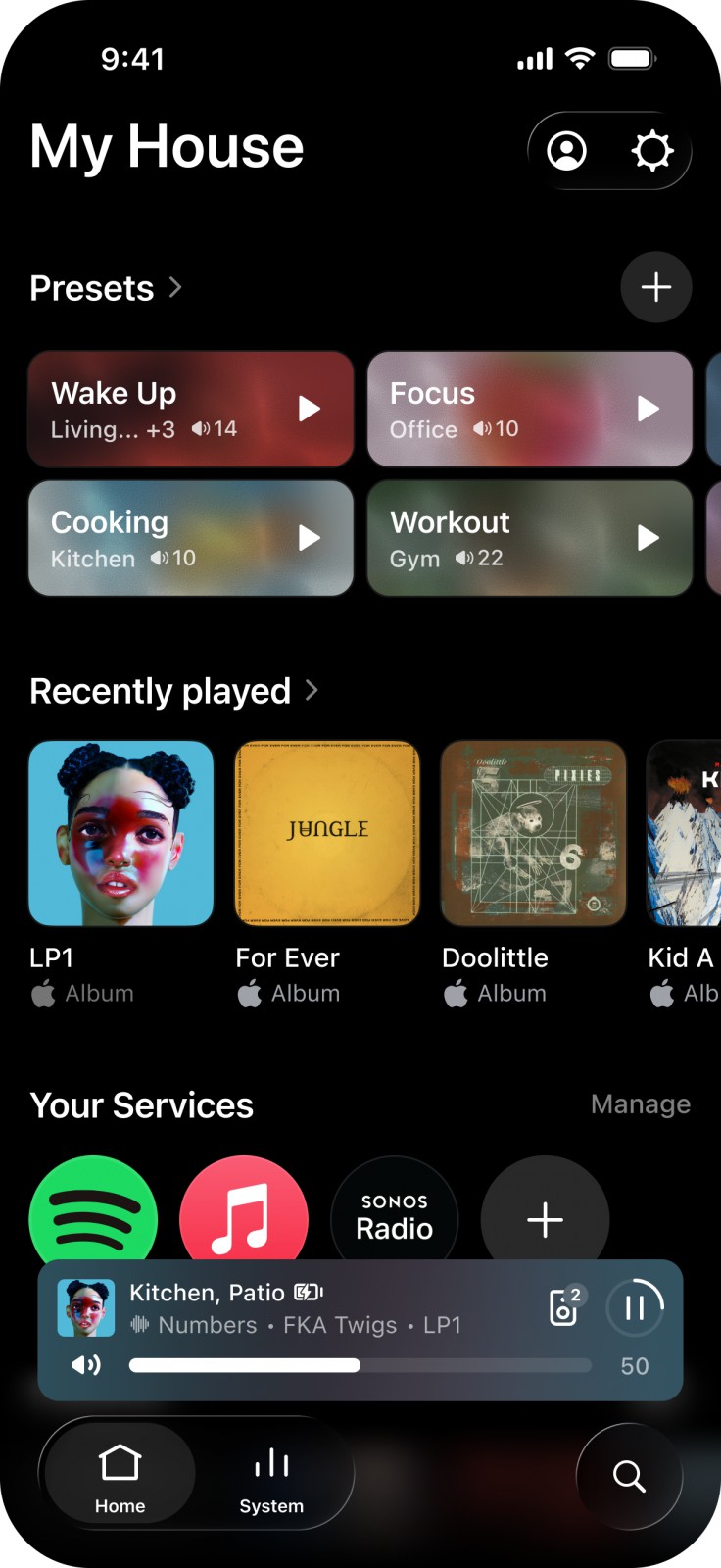
Save the room choice as well as the music
The preset instructions allow content from Sonos Favorites or a search across connected services. The author then chooses one room or several rooms as a group and sets the volume for each. A saved preset can therefore encode a quieter kitchen and a louder adjoining room, rather than assuming the entire group should use one identical level.
There is also a route from an already playing room or group in the System tab. Its menu offers Save as preset, and the current queue can be retained as a Sonos Playlist for the preset. That is useful when the desired arrangement already exists: the app can preserve it instead of making the listener reconstruct the choices from memory.
The room behavior deserves attention. If some selected rooms are already playing within a group, the preset starts its chosen music in those rooms; other rooms from that group keep their existing music. A preset is therefore capable of changing the listening arrangement rather than merely replacing a playlist everywhere.
System Health arrives on iOS
The same release introduces System Health in the iOS app’s Help Center. Sonos’s support description says it shows registered systems, connection status, network and product counts, with expanded information such as an IP address or Wi-Fi channel. It also provides account and controller-app details.
That can make a support conversation more concrete: a missing speaker and a speaker visible on an unexpected network are different starting points. It is still diagnostic information, not a promise that the app can automatically repair every wireless problem. The current release notes identify this feature with iOS; Android’s listed addition is the ability to reorder connected services.
Other 27.3 changes include reorganizing featured favorites and swiping to skip in the player. Sonos warns that app releases and individual features can arrive over several days or, in some cases, weeks, so an updated version number is not a universal same-minute availability guarantee.
Our portable-surround coverage looked at hardware moving between listening roles. Presets address the repeated setup inside those roles. The benefit is less about a new way to hear a song than about making a familiar arrangement easy to restore—without accidentally turning every room into the same listening space.