HyperOS 4 explained: the interface, features and limits behind Xiaomi’s update
A detailed visual guide to Soft Light Glass, Notes, Recorder, Smart Hub and HyperCore, with official screenshots, explained performance claims and regional release distinctions.
HyperOS 4 changes two things you notice every day: how a Xiaomi phone presents information, and how much work it does before that information reaches the screen. The adjustable clock and translucent controls are the visible part. Memory preparation, rewritten system apps and a different execution path for Xiaomi’s own software are the less photogenic part—and potentially the more valuable one.
There is also more than one HyperOS 4 experience. Xiaomi’s global beta announcement, its mainland China showcase and the update offered to an individual handset describe different scopes. This guide follows the documented features and interface images, explains the engineering claims, and separates them from promises Xiaomi has not made for every phone or market. Availability was checked on 25 October 2026.
First, which HyperOS 4 are we looking at?
Xiaomi opened its global beta programme in September. Its 16 October update notice still explicitly addresses beta participants, with fixes for Gboard, home-screen icons and widgets, Clock and Weather. That is a useful description of the software’s current development state, rather than a general promise that all supported phones have received a finished release.
Separately, Xiaomi’s China stable-release announcement gives 15 October as the start of staged delivery to existing devices. A Chinese stable announcement does not convert a Global or EEA beta into a stable release. EEA means European Economic Area; it identifies a regional software branch, not an additional feature tier.
The visual examples below show Xiaomi’s announced interface design. The global beta and China-specific examples have different regional scope, and an individual build can look different. This distinction matters especially for widgets and assistant features. The comparison panels distinguish the HyperOS 3 and 4 examples.
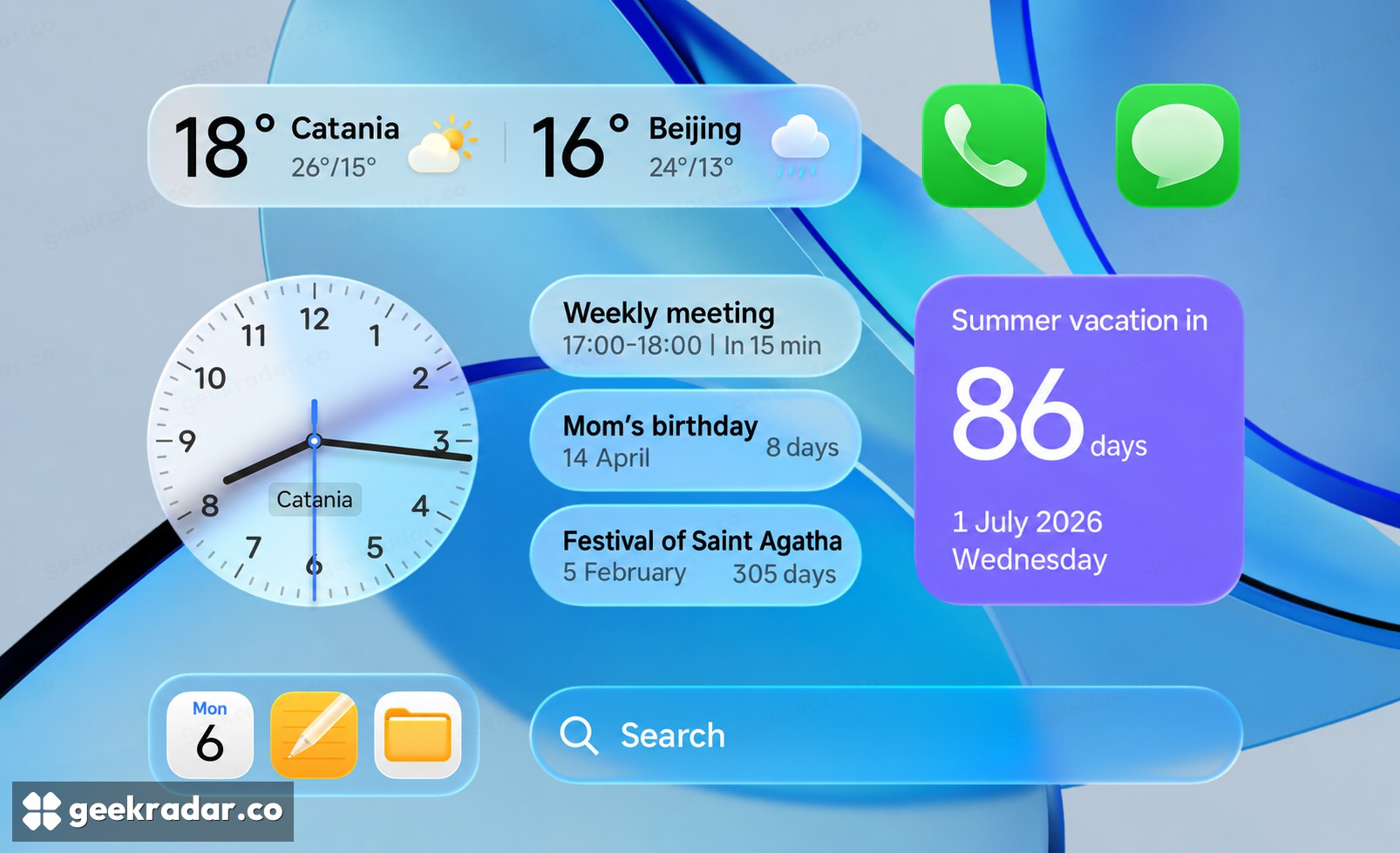
Soft Light Glass: depth that follows the content
The most obvious visual change is Soft Light Glass, Xiaomi’s name for the translucent surfaces and light effects used across the interface. Its global feature presentation describes a material that reacts to interaction and takes visual cues from what sits behind it. The China example shown here makes the idea easy to see: weather, reminders and search sit on separate translucent shapes rather than flat, opaque rectangles.
That treatment changes the hierarchy of the screen. The wallpaper remains visible, while the pale edges tell you which elements can be touched. It can make a crowded layout easier to parse when text stays distinct from the background. The same composition also exposes the tradeoff: a busy wallpaper and several translucent layers compete for attention. More transparency is not automatically more legibility.
Hardware eligibility is separate. The China showcase’s footnotes restrict the full glass material and interaction effects to specified flagship platforms: Snapdragon 8 Elite and later phones/tablets, Dimensity 9500 and later phones, and XRING O1 and later phones. These are China-page conditions, not a complete global compatibility list. An older device receiving HyperOS 4 should not be assumed to reproduce the entire launch demonstration.
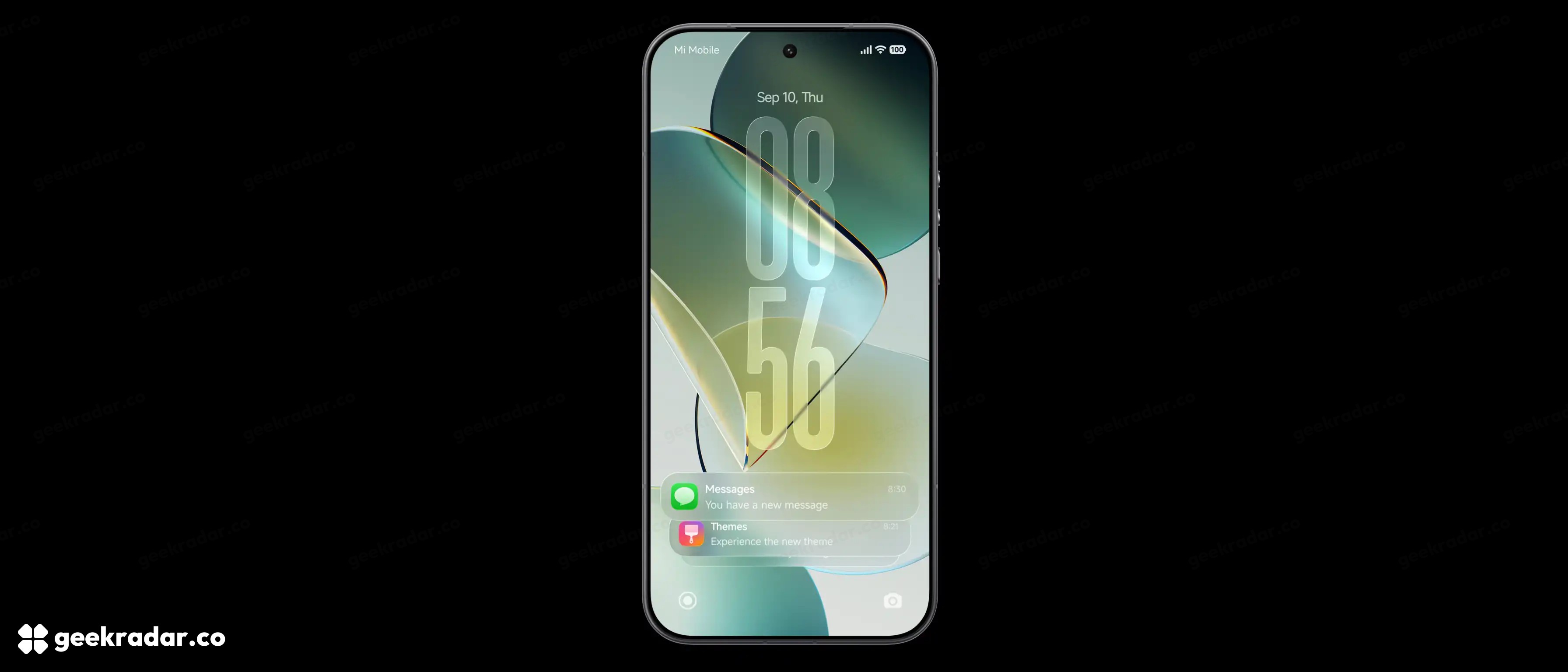
The lock screen gives the clock and notifications different jobs
Xiaomi’s English interface image uses an elongated, two-line clock above a compact notification stack. Messages remain near the bottom rather than spreading across the whole wallpaper. The global announcement describes clock scaling in both directions, different type styles and single- or double-line arrangements; swiping expands the notification stack.
The useful change is control over the balance between recognition and detail. A large clock is easy to find at a glance. Collapsed notifications preserve space, while expansion makes their contents available when needed. A commuter checking the time and someone reading several incoming messages are using the same screen for different tasks; the layout no longer has to give both tasks equal space all the time.
The screenshot does not establish that every notification exposes identical actions or that all clock styles exist on every device. Xiaomi explicitly allows model and version differences. Its China notes also distinguish adjustable clock layouts from the glass effect applied to certain clocks, and say tablets and some entry-level devices are outside that particular lock-screen feature’s scope.
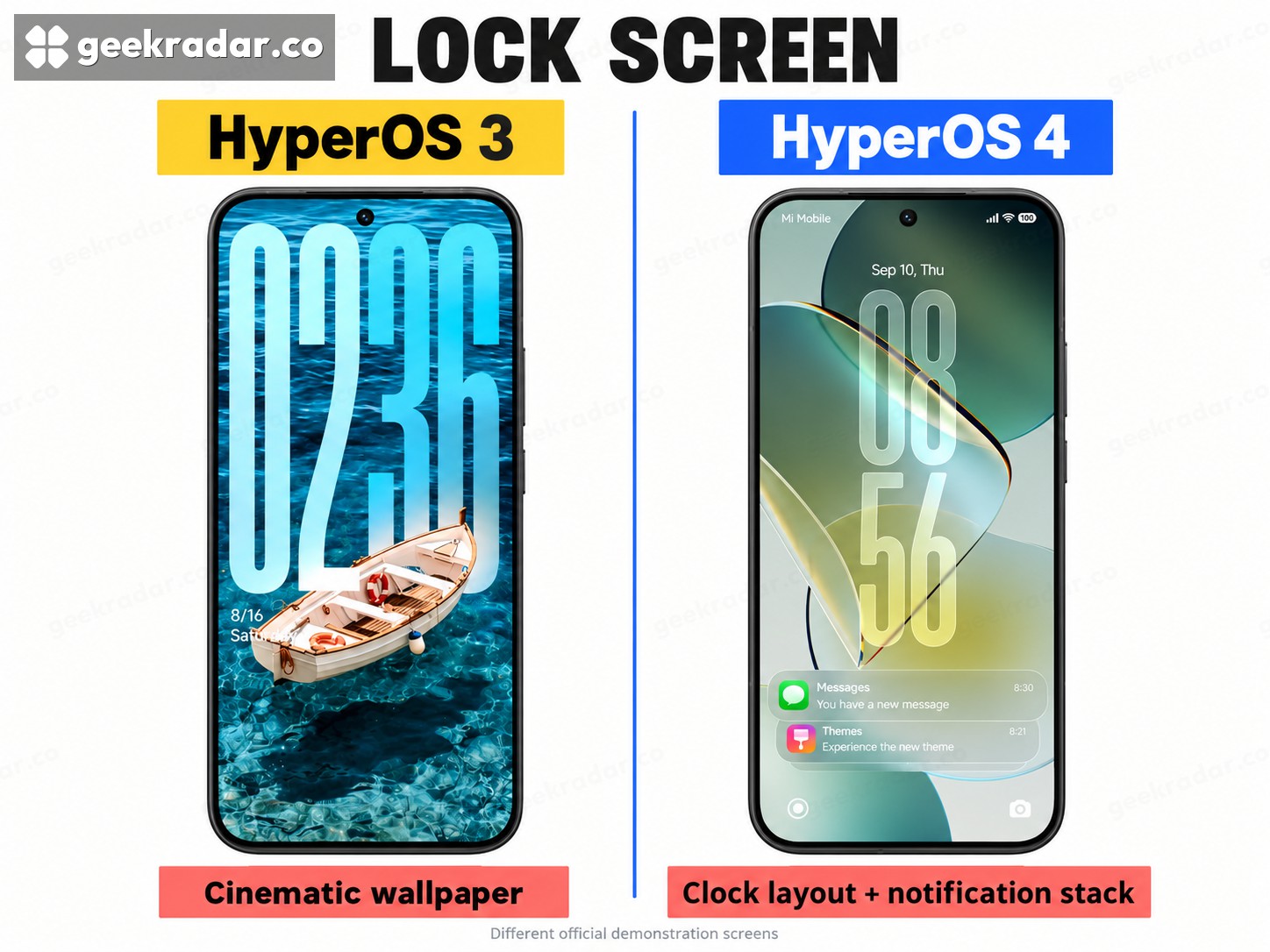
HyperOS 3 and 4: what the lock-screen comparison shows
Xiaomi’s HyperOS 3 presentation already offered cinematic wallpapers and personalised lock screens. The boat example even uses an extremely tall clock. Large typography itself is therefore not a new HyperOS 4 feature. The version 4 demonstration puts a two-line clock above translucent notification cards; the announcement adds the documented scaling and stacking behaviour. The two different wallpapers show the design choices, not a controlled test of contrast or animation.
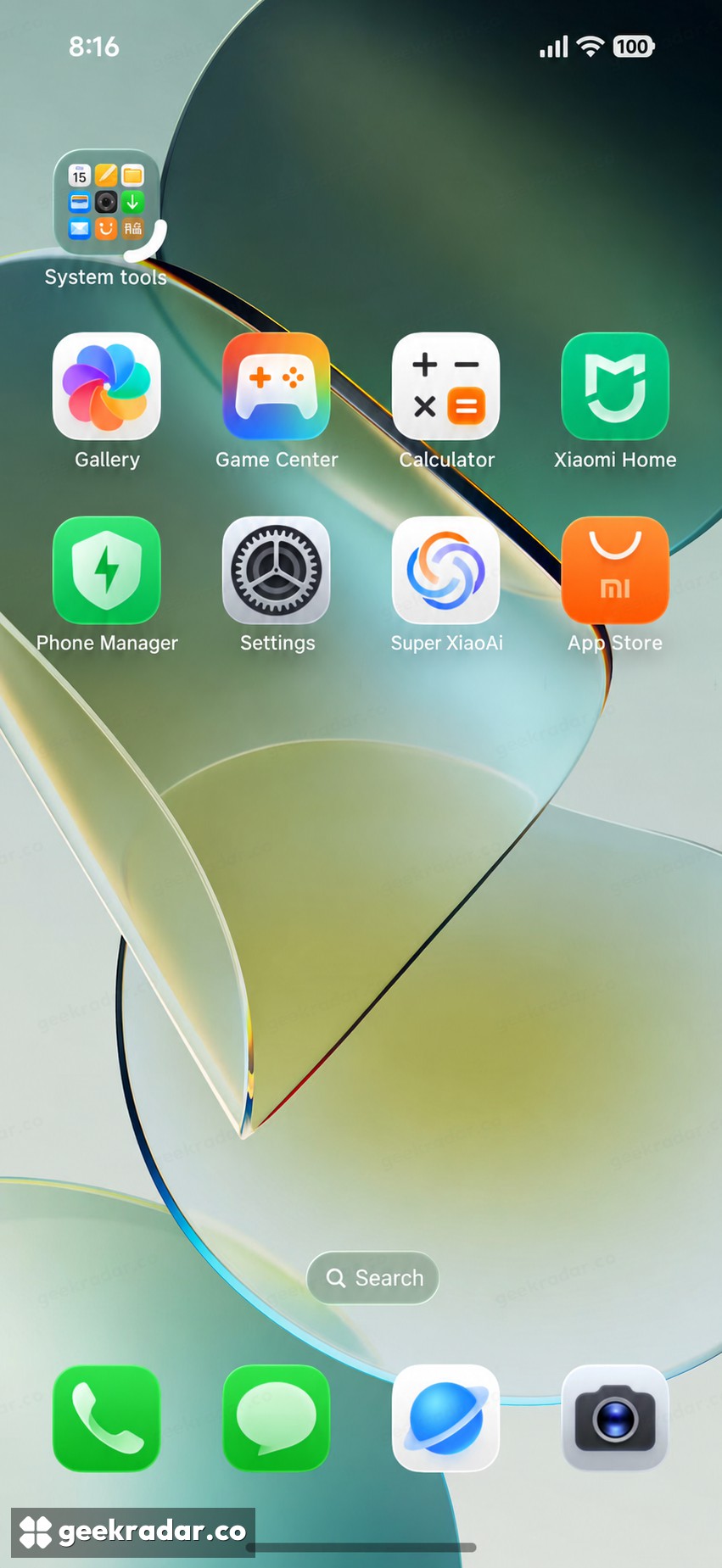
Folders become a layout tool; tablet apps get their own treatment
The global announcement lists folder layouts of 1×1, 1×2, 2×1, 2×2 and 4×2, with resizing through dragging. This gives a frequently used group of apps more space without treating every folder as equally important. A work folder can occupy a visible strip while occasional utilities remain compact.
In the China screen shown here, the curved white handle beside the system-tools folder illustrates the resizing interaction. It is a still from Xiaomi’s demonstration, so it shows where the interaction starts rather than documenting every intermediate animation. The underlying global claim is the supported range of layouts; the apps shown are not a promise about the apps or widgets supplied elsewhere.
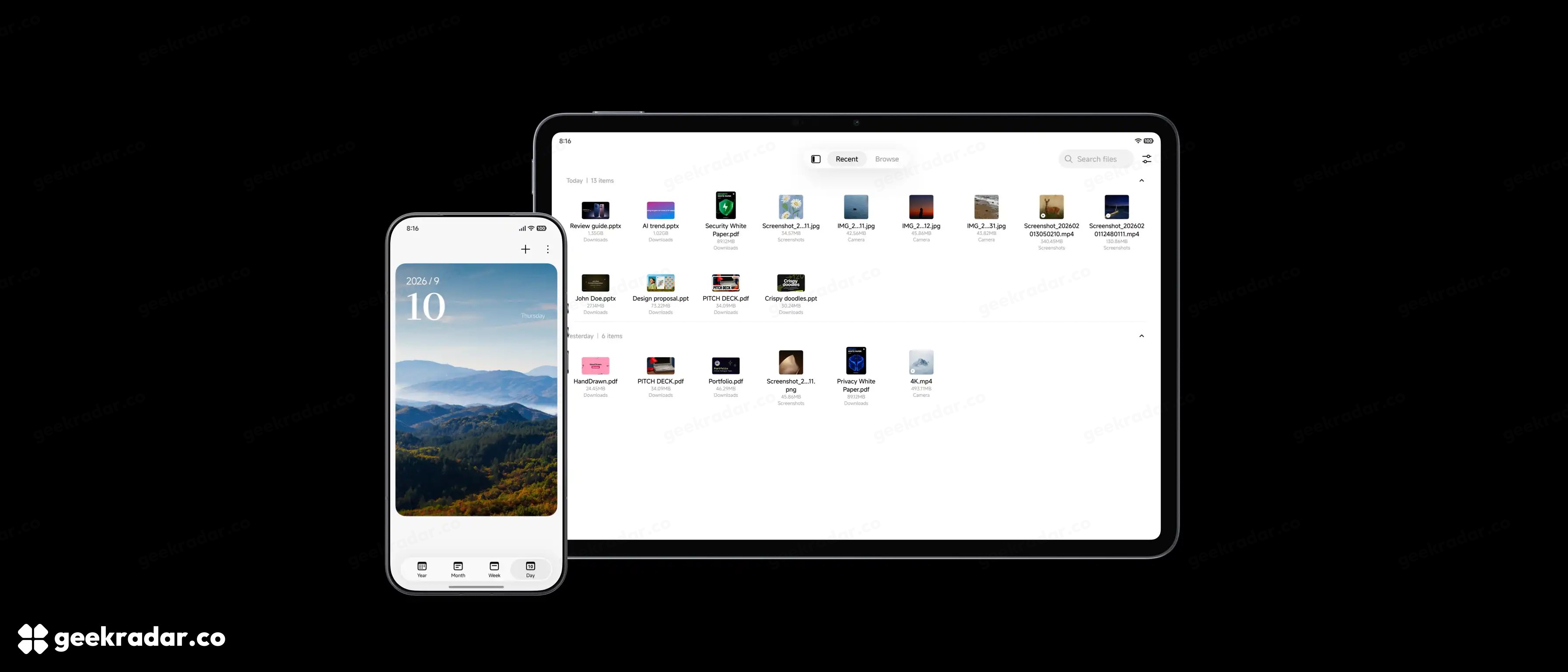
On tablets, controls follow the larger canvas
In Xiaomi’s paired phone-and-tablet image, the phone calendar puts its view selector at the bottom, while the tablet file browser uses the wider canvas for a grid and controls along the top. The global presentation describes unified floating frames, but the visual evidence shows why “unified” should not mean identical placement at different sizes.
That matters more than making both devices resemble the same screenshot. A control comfortably reached with a thumb on a phone may belong elsewhere when the display is supported on a desk. Xiaomi’s China notes also limit tablet folder behaviour differently from phone behaviour. Do not read the phone’s five folder sizes as a guarantee of the same resizing options on a tablet.
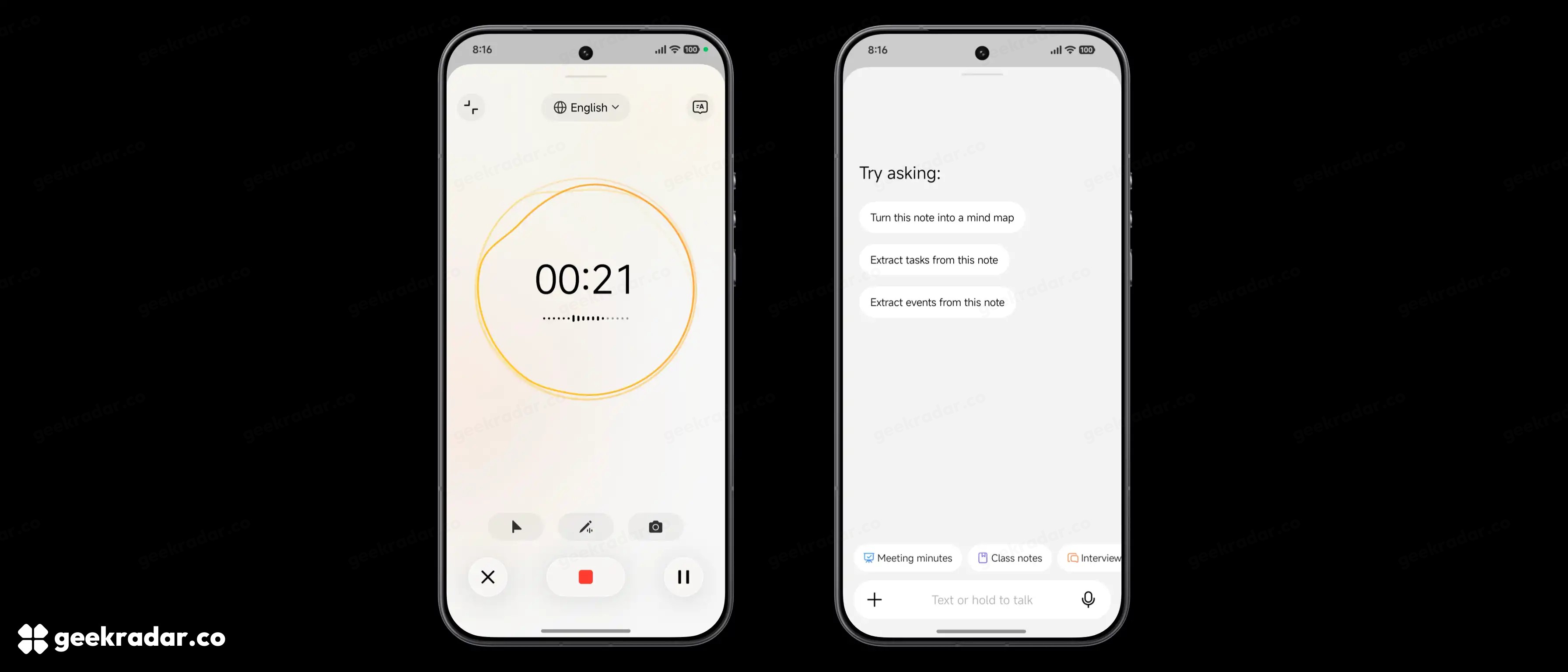
Notes: capture a thought, then decide what it becomes
The new AI Voice Note workflow in Xiaomi’s global presentation connects spoken capture with structured notes. The image shows a recording view on one side and suggested transformations on the other: turning a note into a mind map, extracting tasks or finding events. The microphone, text field and note-type choices make this a workflow inside Notes rather than a separate chatbot window.
The distinction between capture and transformation is useful. Speaking while walking may preserve an idea that would otherwise be lost, but a raw transcript is not necessarily something you want to revisit. A task list can be more actionable than a paragraph containing several plans. A mind map can make relationships easier to scan. Those benefits depend on the resulting structure preserving the meaning of what was said.
For example, “ask whether Friday is possible” should not silently become “meeting confirmed for Friday.” Treat generated tasks and dates as proposals to check against the original note. That is particularly important when the conversation contains alternatives, corrections or uncertainty. Xiaomi itself says HyperAI availability varies by language, region and device, that some functions require an internet connection, and that answers should be checked.
The English selector in the screenshot confirms the language of this demonstration. It is not a supported-language list. A system UI being translated into your language does not, by itself, establish that every speech or generative feature supports that language too.
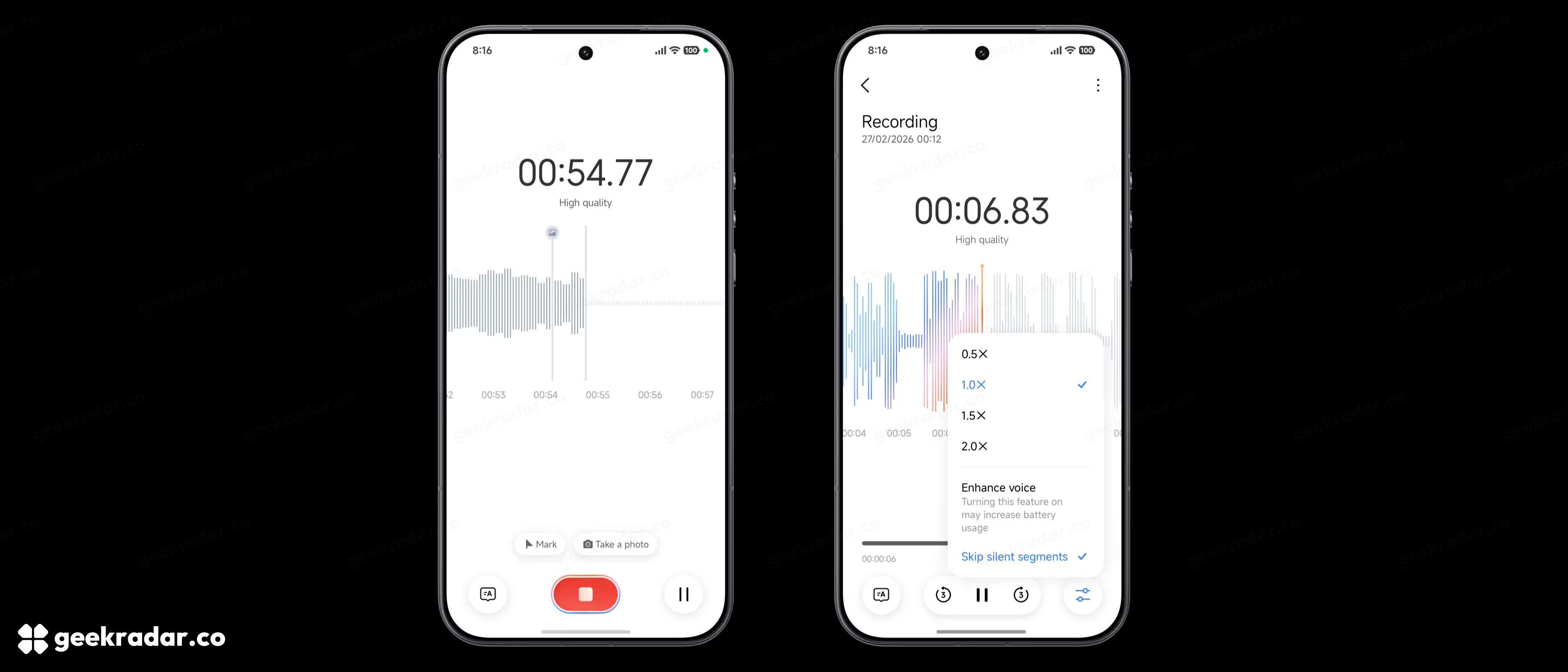
Recorder makes it easier to find the useful minute
The Recorder images show two concrete additions to the review process: markers during capture and a playback option to skip silent segments. Xiaomi’s accompanying explanation describes an interactive outline tied to timestamps and visual anchors. The goal is to make a long recording navigable after the conversation has finished.
In the capture screen, the marker and photograph controls sit above the recording controls. That is useful context for a lecture or a meeting: an image of a slide can serve as a reference point for the corresponding part of the audio. During playback, silence skipping offers a different saving from simply increasing speed. It removes waiting without requiring every spoken sentence to be played faster.
Neither function changes what was actually agreed or said. A generated outline is a route back to the recording, not a replacement for it. For a disputed figure, a name or a decision, the timestamped original remains the useful reference. The benefit is the shorter path to that evidence.
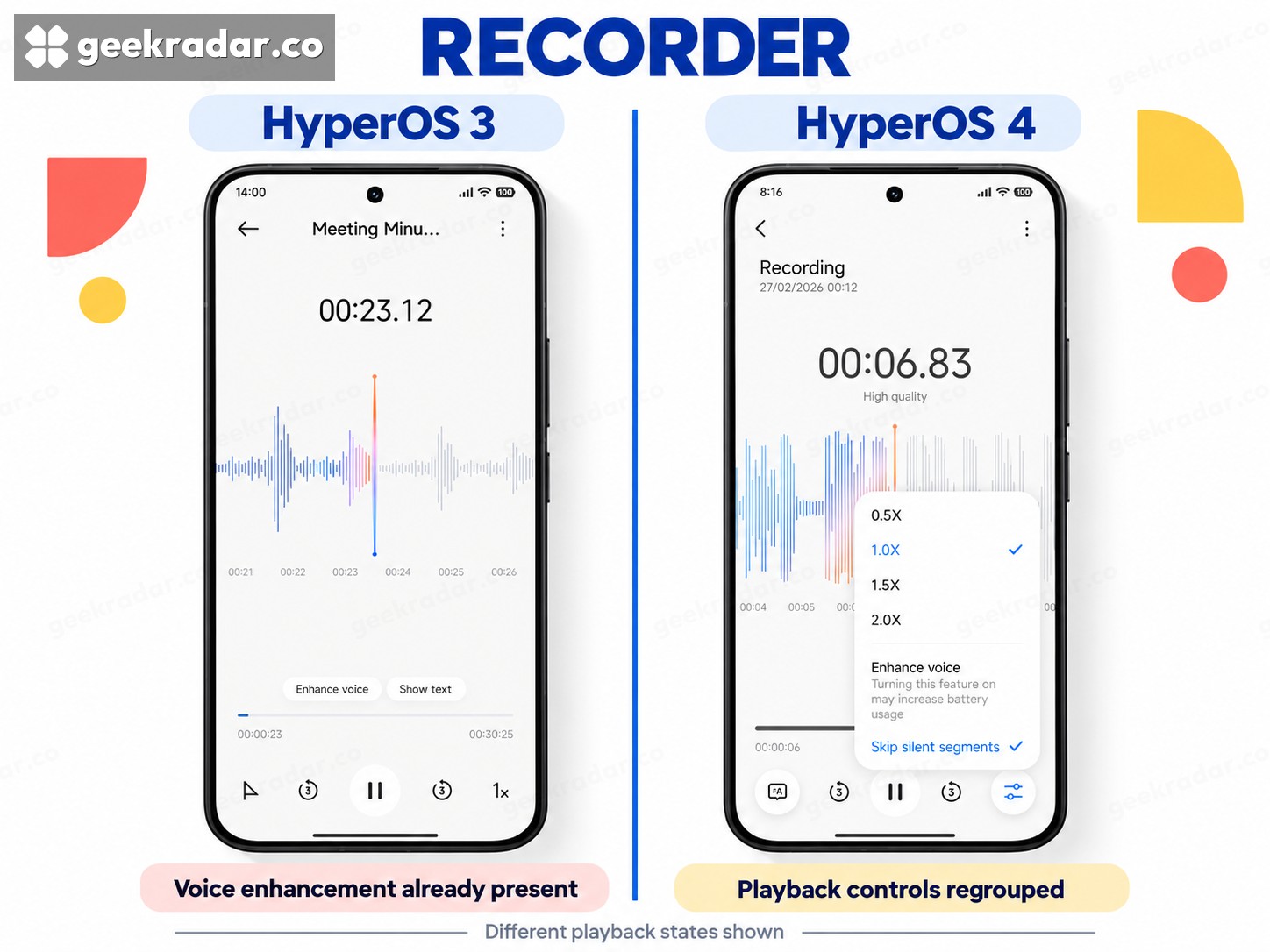
HyperOS 3 and 4: reading the Recorder controls
The HyperOS 3 playback screen already contains Enhance voice and Show text. Its official feature description also includes live transcription and summaries. In the HyperOS 4 example, voice enhancement sits inside a playback menu alongside speed settings and Skip silent segments. This comparison shows how the demonstrated controls are organised; it does not prove that every option absent from one picture was absent from that operating system. The recording times and waveforms belong to different examples.
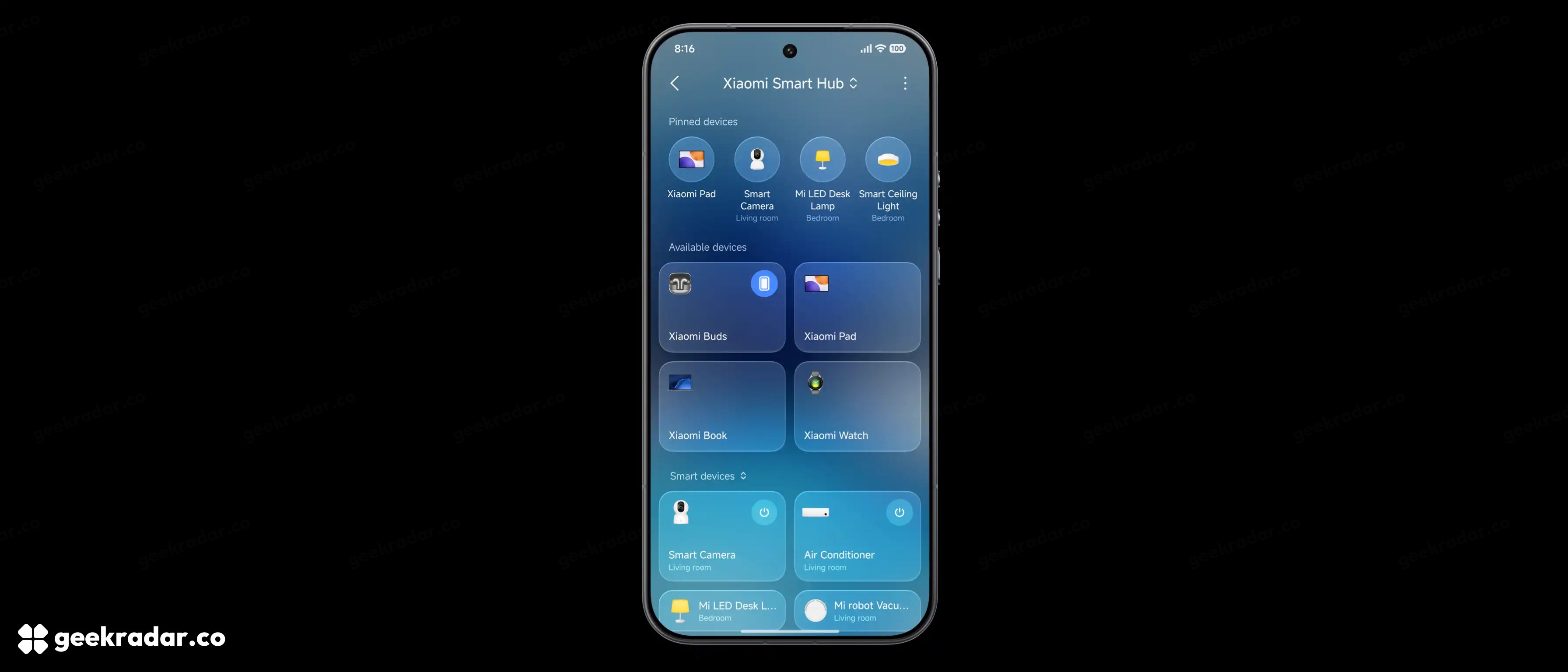
Smart Hub: prioritising the devices you actually touch
Xiaomi’s Smart Hub screenshot places a row of pinned devices above larger tiles and a smart-device list. The global announcement also describes pinning automation routines and switching between different homes from the main view. These are small navigation changes with an obvious audience: people whose device collection has outgrown a single uncluttered panel.
Pinning matters because discovery and daily operation have different needs. A comprehensive device list is helpful when setting up a home, but it can become friction when the same lamp or air conditioner is adjusted repeatedly. Giving those controls a stable place is a more concrete benefit than simply adding another connected-device animation.
The screenshot is a demonstration of the hub’s layout, not a universal compatibility chart. It shows Xiaomi devices and appliances; it does not establish that every third-party product will appear with the same controls. Compatibility, account setup and the relevant app remain separate requirements.
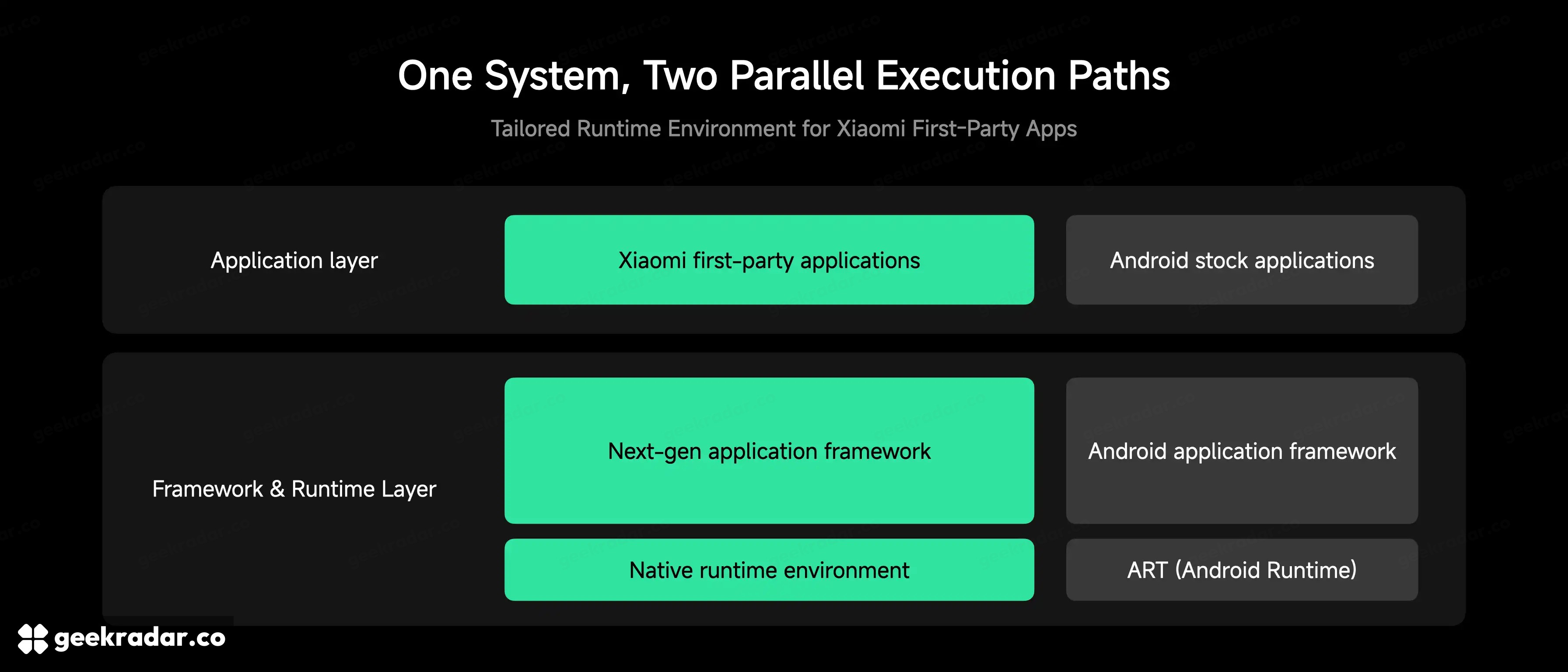
HyperCore: doing less work before drawing the next frame
Under the visual changes, Xiaomi groups several optimisations under HyperCore, which its global explanation calls a core technology suite. That wording matters: HyperCore should not be treated as proof that Android has been replaced. Xiaomi’s own architecture diagram still shows a separate Android application framework and Android Runtime alongside the path for its first-party software.
Two additions address different causes of delay. Precision Workload Scheduling analyses instruction execution across common tasks, seeking redundant work and unnecessary background wake-ups. Memory Preloading anticipates an app’s memory needs and prepares memory before the user requests the action. Xiaomi uses camera preview and lens switching to explain the latter.
A fast processor can still wait for memory to become ready. Moving preparation earlier can therefore improve responsiveness without changing the chip. Conversely, cutting instruction counts is not equivalent to increasing processor speed by the same percentage: the instructions removed, the workload and other bottlenecks all affect the result.
Xiaomi also describes a dedicated application runtime for its own apps, with different handling for a foreground interface and a background task. The engineering idea is straightforward: a small background operation should not have to carry every capability needed to draw a complete interface. The diagram’s separate paths establish the intended scope. They do not justify claiming that every downloaded Android app has been rewritten or now uses Xiaomi’s new runtime.
The performance figures need their test labels
Xiaomi says it rewrote Launcher, Weather and Gallery, and publishes substantial improvements in its global presentation. The figures below are Xiaomi Internal Labs results comparing HyperOS 4 with HyperOS 3 on Xiaomi 17 Ultra, averaged over repeated trials. They are not independent measurements or guarantees for older models.
| Xiaomi’s global test claim | Reported change | How to interpret it |
|---|---|---|
| Available memory after eight hours | 33% more | A memory-management result, not additional physical RAM |
| Hot launches across 30 apps after nine hours | 9.4% less time | A specific launch test, not a universal app-speed figure |
| Gallery scan of 10,000 photos | 90% less time | A particular library task, not every Gallery operation |
| Gallery CPU and memory use | 28% and 32% lower respectively | Resource measurements with different meanings from elapsed time |
The China page publishes a different 30-app launch comparison: 169.4 seconds against 139.7 seconds after nine hours, a 17.5% reduction. Its label does not identify the same “hot launch” test used in the global article. The responsible comparison is to keep each result attached to its own description, rather than choosing the largest number and calling it the speed improvement.
The more persuasive part of the proposal is the choice of workloads. Launching apps after hours of use and scanning a large photo library concern accumulated friction, rather than a freshly restarted phone doing one isolated task. They are relevant targets. How consistently the gains survive different hardware, app collections and real libraries remains a separate question from the lab figures.
China’s assistant showcase is not a global feature checklist
The mainland presentation gives considerable space to Super XiaoAi 2.0, MiMo, Expert Mode and assistant tasks across devices. Xiaomi’s corporate statement also records that direction, including task orchestration and cross-device work. The global beta presentation instead documents HyperAI features such as Voice Note and the Recorder changes discussed above.
The China page says certain sensitive actions require confirmation in Expert Mode, with controls for memory and app access. Those restrictions are material: they qualify particular modes rather than promising an identical consent experience across every assistant interaction. Its keyboard and AI-call features are also explicitly mainland-scoped. A feature list assembled without those boundaries would describe a phone nobody has been promised.
There is an older-version trap too. Xiaomi’s global HyperOS product page still identifies its feature set and rollout table as HyperOS 3 when checked for this guide. It already describes HyperIsland, AI tools and cross-device features. Finding a capability on that page is therefore insufficient evidence that it is new in HyperOS 4.
Before joining the beta, check the way back
The official beta FAQ is more useful than an unofficial eligibility spreadsheet. It specifies selected Global and EEA builds and explains that approval does not guarantee an immediate update. Its documented models include Xiaomi 17 Ultra, Leica Leitzphone powered by Xiaomi, Xiaomi 17, Xiaomi 17T Pro, Xiaomi 17T, Xiaomi 15 Ultra and Xiaomi 15. These are beta-programme entries, not a complete future stable-support list.
For a missing update, Xiaomi tells participants to check the installed HyperOS 3 version, whether the registered Xiaomi account matches the phone’s account, and whether the firmware is an eligible Global or EEA version. The system updater remains the relevant place to check an offered build. Our earlier guide to rollout lists and individual updates explains why the model name alone is insufficient.
The FAQ also explains that post-update recompilation can temporarily increase power consumption and temperature, generally settling over one to three days. That makes the first few hours a poor basis for a battery-life verdict. It is not a reason to dismiss persistent problems: Xiaomi provides the Services & Feedback route for reports, with logs and relevant captures.
The upgrade’s most valuable change may be the quietest
HyperOS 4’s strongest documented proposition is the combination of more flexible screens and less effort between an intention and its result: a notification that expands when needed, a recording that returns to the right passage, a background task that avoids loading unnecessary machinery. Those are specific improvements with identifiable users, even before an assistant performs an elaborate demonstration.
For an owner, the sensible question is which of those improvements reaches the correct build without compromising the apps the phone already depends on. A larger clock can make the update recognisable on day one. Finding the right note, opening the camera promptly and having the same controls behave reliably a month later are what would make it worth keeping.