Chrome adds a middle-ground warning for sites that look suspicious
Enhanced Protection distinguishes uncertain risk from established danger and looks for clipboard tricks used in social-engineering attacks.
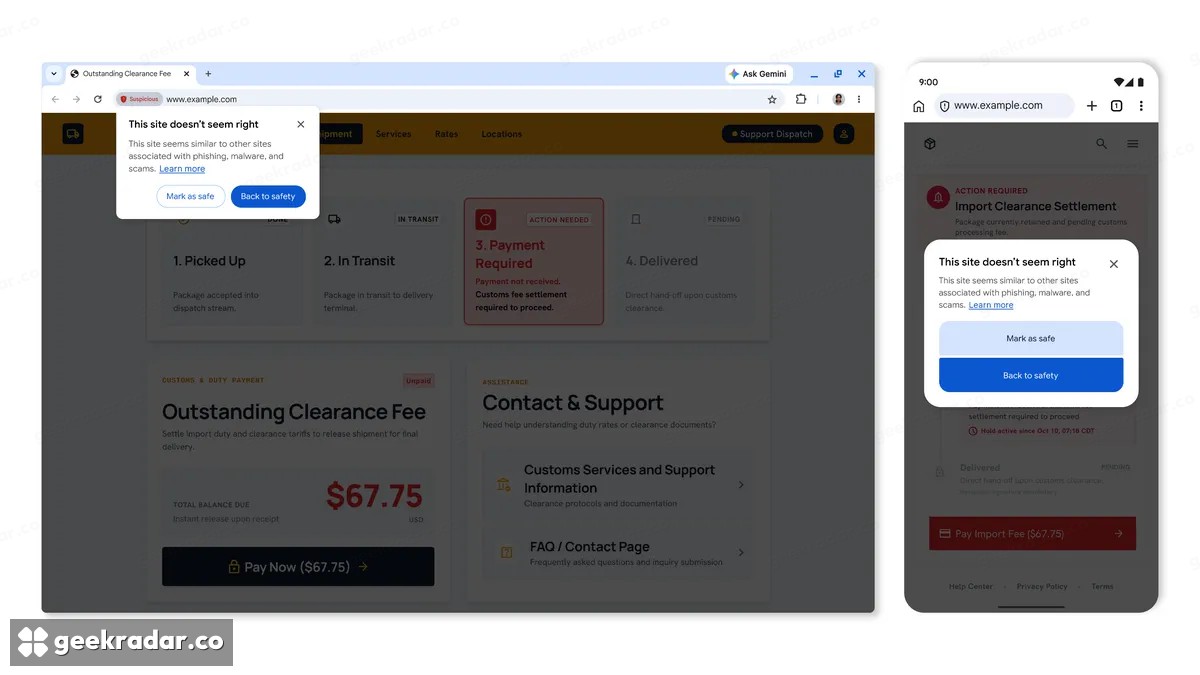
Chrome’s latest scam defenses introduce a useful distinction: a suspicious site does not receive exactly the same warning as a site Google considers clearly dangerous. Under Enhanced Protection, the browser can now flag deceptive patterns before it has the higher-confidence verdict associated with its familiar full-page red warning.
Google describes the change in its 2026 web-scam update. The warning’s wording, color and presentation communicate different confidence levels. That is a more informative approach than making every concern look equally certain, but it also asks users to understand what the softer warning means.
Image: Google.
A warning is evidence about risk, not a final judgment
The distinction is between suspicion and a stronger determination of danger. It should not be read as “safe unless the whole screen turns red.” A site can present enough concerning behavior to justify stopping before entering credentials, even if the browser has not classified it with the highest confidence.
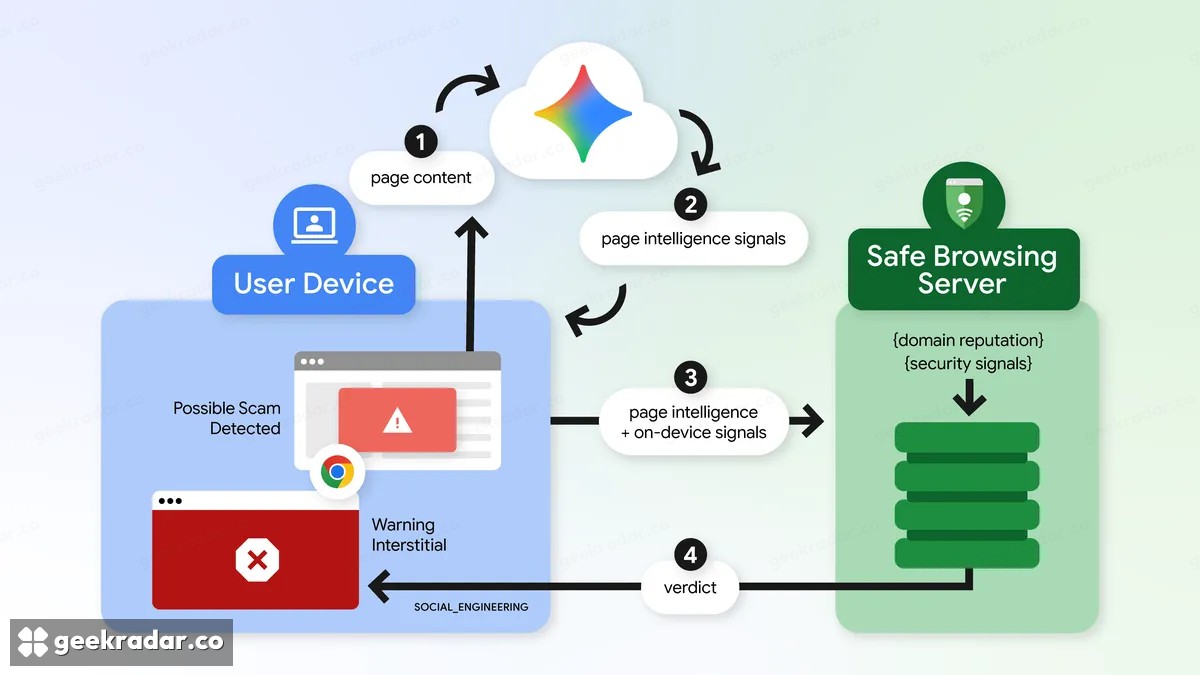
Google also describes a move from its earlier on-device scam-detection model to a more powerful server-side Gemini model for users who enable Enhanced Protection. Page analysis is combined with domain reputation and other signals. According to Google, page text is sent only when high-confidence scam indicators are present, processed temporarily and not retained or used for model training.
Those are the company’s stated handling conditions. The Safe Browsing settings documentation is important because Enhanced Protection is a choice with different data-sharing behavior from the standard mode. A security benefit and a privacy decision can be part of the same setting.
The clipboard can be the escape route
The update also addresses ClickFix, a scam that asks people to copy and run a command to repair a supposedly broken browser or pass a fake check. The attacker tries to move the harmful step outside the browser, where ordinary download warnings may no longer be involved.
Chrome’s new protection analyzes suspicious copied commands for Enhanced Protection users and can issue a warning. Google says personal information is removed from the clipboard payload before analysis. This does not turn instructions from an unknown website into something trustworthy; it adds another opportunity to interrupt the manipulation.
Our coverage of PHP2Shell illustrates the wider problem of turning familiar tools into an attack path. The important question is the origin and purpose of a command, not whether the terminal or operating-system utility itself is legitimate. A webpage claiming that Chrome needs repair does not acquire authority to administer the computer.
One headline claim deserves extra care: Google says Enhanced Protection users are ten times safer, but its footnote describes a comparison of average safety warnings shown. That measurement should not be restated as an independently established tenfold reduction in successful compromises.
These changes are relevant to Italian users of Chrome as well as the international audience; the announcement does not frame them as a US-only release. The most valuable moment remains the pause before entering a password or executing a command. A more nuanced warning can support that decision, provided its quieter appearance is not mistaken for permission to ignore it.