Proton VPN 8.0 lets iPhones keep CarPlay connected with the kill switch on
A nearby printer can stay reachable while internet traffic is blocked. The new Advanced setting also changes what happens when you deliberately disconnect on iPhone or iPad.
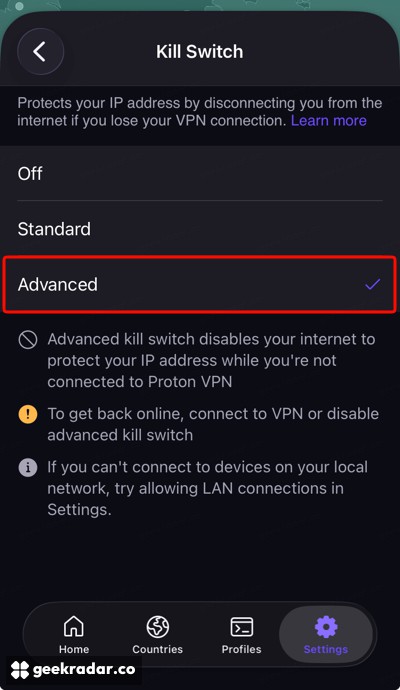
Proton VPN 8.0 gives iPhone and iPad owners a choice about what the Disconnect button should do. With the standard kill switch enabled, tapping it lets the device go back to using the internet directly. With the new Advanced setting, that same tap leaves ordinary internet traffic blocked. Meanwhile, Proton says Apple CarPlay and devices on the local network can now remain reachable with the kill switch on.
The distinction is easy to miss behind the update’s new spinning globe. Proton dates the stable 8.0.0 release to November 9. Apple is now featuring the update on the App Store, and TechRadar reported on its rollout on November 18. The practical change is easiest to see when a connection ends.
A dropped connection and a deliberate disconnect
Suppose an iPad is uploading a file over Wi-Fi through the VPN. The connection to the VPN server fails, but Wi-Fi still works. The standard kill switch is designed to stop traffic from falling back to that direct connection. Otherwise, a service contacted over the ordinary internet connection could see the network’s public IP address in place of the VPN server’s address.
Now suppose you end the VPN session yourself. The standard setting treats that as permission to resume ordinary access. Advanced keeps the block in place until the tunnel is available again or you change the setting. That difference matters on a shared iPad or on a phone where the VPN usually runs in the background. The next app you open inherits the choice you made when you disconnected.
Proton’s settings guide puts the choice under Settings → Security Options → Kill switch. Its help pages still describe the mobile feature as a beta in places. The version-specific release notes and the public store listing both include it in 8.0.0.
Why a nearby printer is a different case
A print job sent to a printer on your home Wi-Fi can stay on the local network. A request to an online print service needs an internet connection. Version 8.0 explicitly supports connecting to local devices and CarPlay with the kill switch enabled. If a nearby device is unreachable, Proton’s settings screen suggests checking whether LAN connections are allowed. There is no need to make internet access outside the VPN your first troubleshooting step.
One qualification matters for privacy. Proton’s support documentation says some DNS requests from Apple services can bypass the VPN even with the switch enabled. DNS is the lookup that turns a service name into an address. As with the choice of DNS resolver in Mullvad Browser, it matters which software is making that request. The switch is useful for deciding what your apps do when the tunnel drops. Finding a printer on the desk should no longer mean changing that decision for the next website you open.