How to mute licensed songs in GTA VI and keep the original score
The Audio tab has a dedicated switch for recordings and streams. A song caption can still appear after you enable it, and a clip you already saved keeps its original sound.
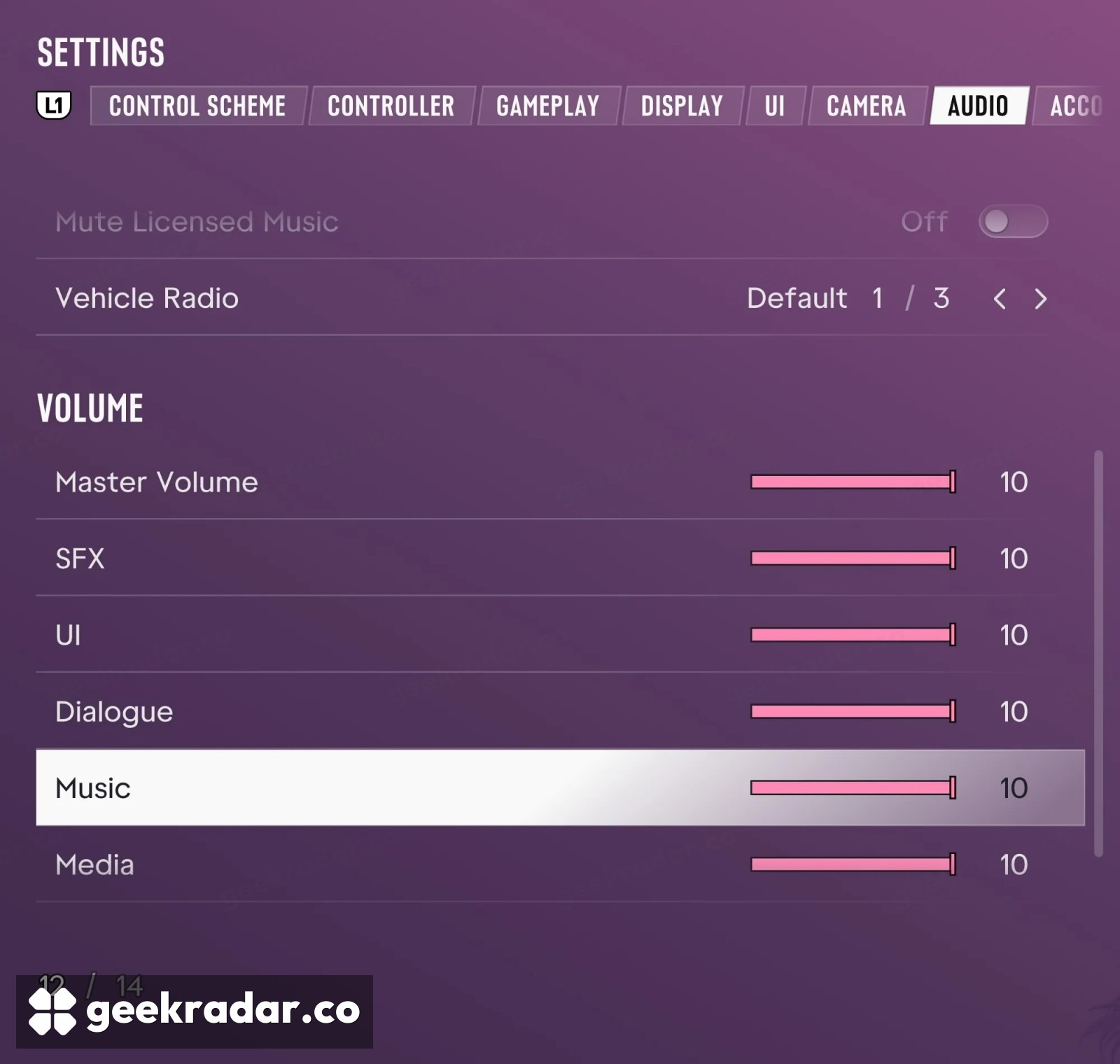
If you want to record a drive through Leonida without the licensed songs, Grand Theft Auto VI has a switch for that. Pause the game, open Settings, go to Audio and turn Mute Licensed Music on. You can leave the main volume sliders where they are. As Shacknews documents in its launch guide, the setting suppresses licensed tracks while allowing music composed for the game to play.
One small detail can make it look as if the switch has failed. When music captions are enabled, GTA VI can still display them for a muted song. The description beside the switch explicitly says so. A caption appearing on screen and a song ending up in the recording are two different things.
The controls that sit beside the switch
Three choices on the Audio tab can easily be mistaken for one another. Vehicle Radio sets the radio’s behaviour in a vehicle. The Music slider changes the volume of music in the mix. Mute Licensed Music selects which music the game will play. If you like the balance between the score, voices and street noise when you play, the last option lets you keep that balance for the sounds that remain. The controls are visible in the PS5 launch screenshot by ViceManual.
There’s a practical reason to make that choice before pressing Record. As our guide to GTA VI’s radio explains, listening in Leonida can continue after a drive ends. Switching off a car stereo addresses that stereo. Applying the licensed-music setting at the source saves you from having to decide where each song in the game is coming from.
What happens when you upload
The switch changes the soundtrack of future play. It cannot remove a track from a clip you recorded yesterday, and it grants no publishing rights to the audio you leave in. YouTube explains that an upload matching material in its Content ID system can be tracked, monetized or blocked, depending on the rights holder’s policy and sometimes the territory. YouTube Studio shows the claimant and the segment involved.
That gives a creator two different places to look when something sounds wrong. A song title appearing during a quiet drive is a reason to check the saved audio. A claim on the uploaded video is a reason to check the timestamp YouTube identified. Only the second one tells you which part of the published clip the platform matched.