Google Search can now read Wallet. Paying still takes a separate step
Wallet is the first of three new connections rolling out to AI Mode. Google’s demo shows what Search can infer about your cards and where the information ends.
Ask which card to use at the supermarket and Google Search can now start with the cards already in your wallet. On November 23, Google began rolling out an optional connection between Google Wallet and AI Mode, the conversational part of Search. It gives Search permission to read information from Wallet. The answer can name a card and explain its benefits. The connection gives it no power to charge the card, move money or make an investment.
Google’s announcement names three new connections, but only Wallet has started rolling out. Google Drive and the Gemini app are due to follow in the coming weeks. The latter is a separate development from Wallet coming to the Gemini app in the US. That earlier update lets someone ask Gemini about Wallet. The forthcoming one would let Search pick up context from a conversation in Gemini.
The table is only as good as the accounts behind it
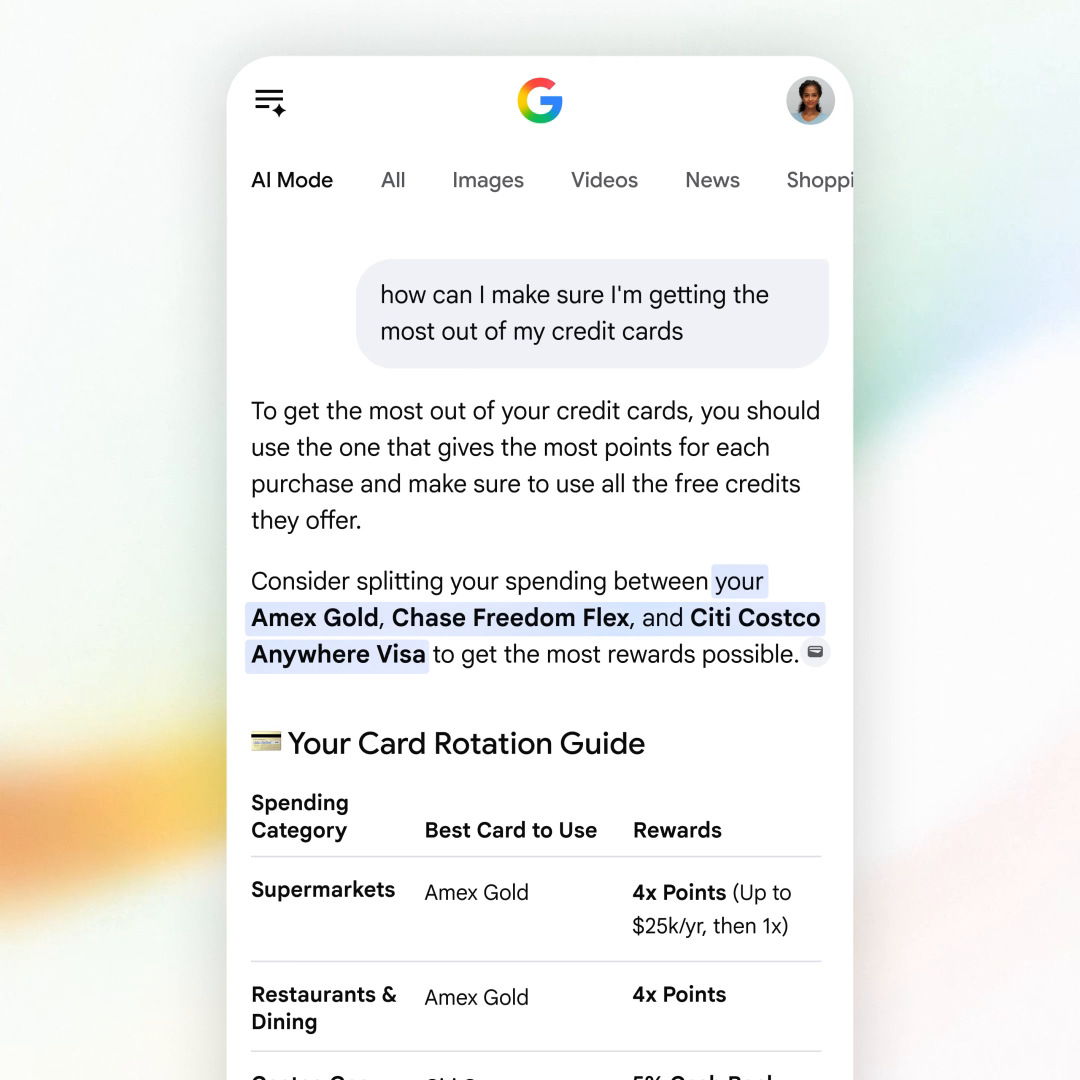
In Google’s demonstration, the user asks how to get more from their credit cards without typing a single card name. AI Mode identifies three cards and makes a table by spending category. Look closely at the supermarket row: next to the points multiplier is an annual spending cap. Once that threshold is reached, the rate changes. That little qualifier can matter more to the answer than the big number beside it.
Knowing which cards someone holds is different from knowing how much they have spent on each. In the US, Wallet offers a separate connection through Plaid to bring in balances and transactions from participating financial institutions. Linking an account there and allowing Search to consult Wallet are separate choices. Someone who has saved a payment card has good reason to ask which information went into a spending summary, especially if some purchases went through another account. The demo illustrates the format of an answer. The card issuer’s own terms are where to check a rate or cap.
Three controls behind one search box
Open Search Personalization, then Connected Apps, to choose which apps AI Mode may consult. Google says the connections can be turned off there. Removing a financial account from Wallet is a different operation with its own controls. The Search eligibility guide lists supported markets and specifies a minimum age of 18. The announcement describes a rollout, so the option can appear at different times.
There is also a way to buy from certain search results. Google’s US checkout documentation describes eligible product listings with a Buy button and a checkout that asks the shopper to confirm payment details and a delivery address. Reading Wallet to compare cards does not perform that confirmation. The distinction echoes Wallet’s recent US iPhone launch, where carrying passes and making a contactless payment were separate capabilities too.
Back at the supermarket, the useful part of the new answer may be the small print Search surfaced. It can point out the spending cap you forgot. Whether it has the transactions needed to tell you how close you are to that cap is a second question, with a different permission behind it.