QSSR on PS5, explained: sharper games, frame-time costs and the limits of AI upscaling
A detailed guide to Sony’s standard-PS5 upscaler, with original comparison frames, independent measurements and practical advice on resolution, graphics modes and PSSR.
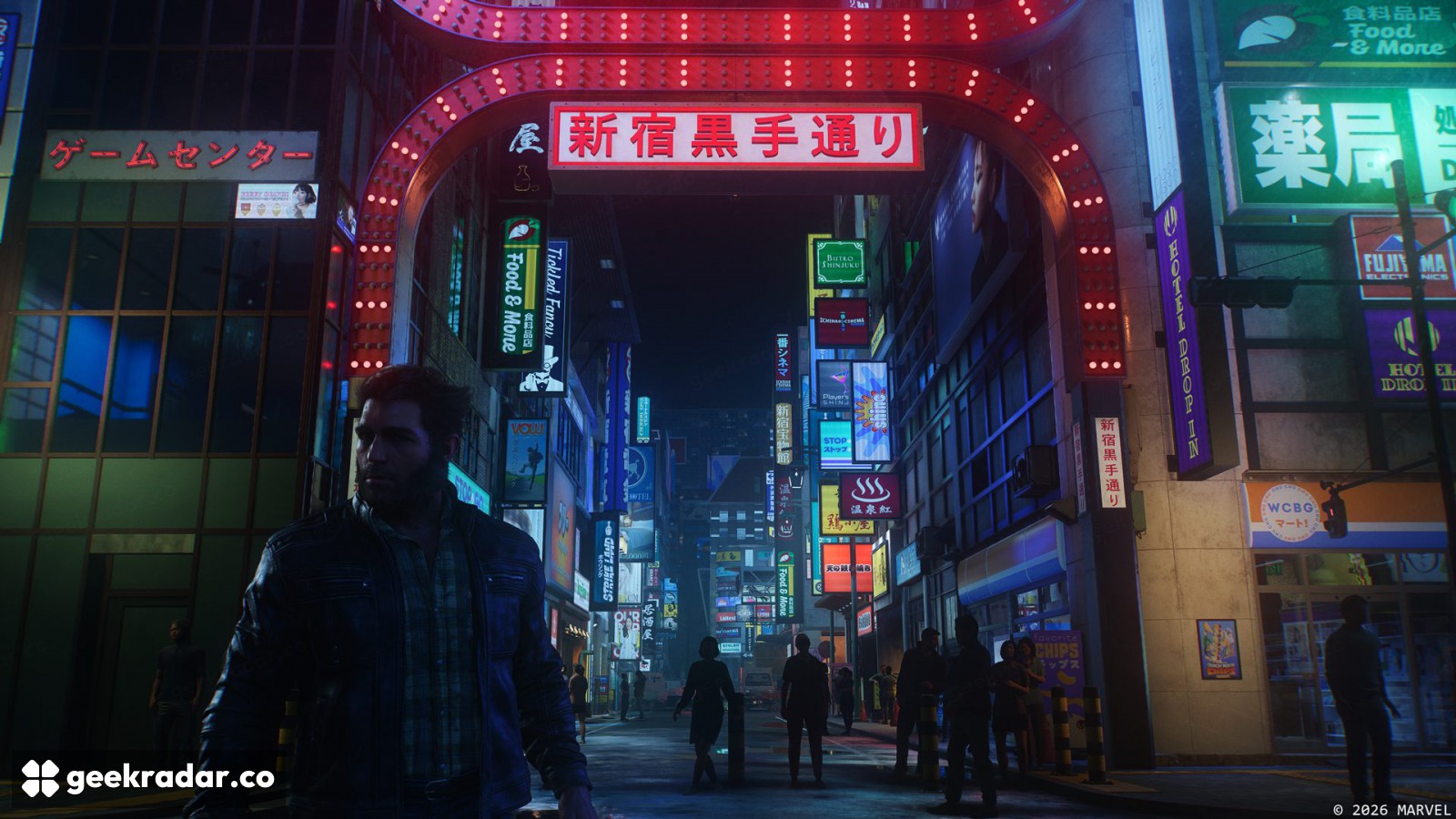
QSSR gives the standard PlayStation 5 a new way to turn a relatively low-resolution game image into a cleaner picture. Its most useful promise is easy to miss in a screenshot: a distant railing, a strand of hair or a patch of foliage should hold together better as the camera moves. The console has not gained a faster GPU. Developers have gained another way to spend the GPU time they already have.
Quick Spectral Super Resolution, announced on October 1, is Sony’s AI upscaling technology for the non-Pro PS5. It debuted in Marvel’s Wolverine and Ghost of Yōtei. Sony attributes the project to its Amethyst collaboration with AMD, a smaller neural-network design and implementation work tailored to the existing hardware. Those are the foundations of the official announcement; the practical question is how the resulting picture behaves within a game’s performance budget.
Our earlier QSSR report covered the rollout. This guide examines the technology, the published tests and the choices that matter when you sit down to play. The announcement is from October 1; this is an October 25 explainer, not a claim that QSSR launched today.
Three resolutions can sit behind one “4K” picture
A game can render its scene at one resolution, reconstruct it to a second, then present a signal matching the television. Those stages are related, but their pixel counts do not have to be identical.
The render resolution describes the underlying image the game produces. The reconstruction target is the size of the image the upscaler builds. The display output is what reaches the screen. Seeing “3840 × 2160” in a television’s information panel identifies the incoming signal; it does not prove that every frame began with 8.3 million independently rendered pixels.
For a 16:9 image, 2560 × 1440 contains about 3.69 million pixels, while 3840 × 2160 contains about 8.29 million. The latter has 2.25 times as many output pixels. That arithmetic explains why “upscale to 4K” can be a substantially different job from “upscale to 1440p.” It does not mean every stage of a game becomes exactly 2.25 times slower: geometry, simulation and many other costs do not scale in that simple way.
An intermediate 1440p reconstruction can still be displayed on a 4K television. Conversely, choosing a 1440p output in the console settings does not establish which internal rendering path a particular game will select. The game’s implementation and graphics mode remain decisive. A television resolution label is therefore a poor substitute for a documented rendering analysis.
Why stable detail matters more than sharp edges
Ordinary enlargement has only so much information to work with. If a thin wire crosses a low-resolution pixel grid, parts of it may appear in one frame and disappear in the next. Sharpening can make the surviving fragments more conspicuous without making the wire continuous.
Temporal reconstruction tackles this kind of problem using information across frames. In AMD’s documented FSR2 implementation, motion vectors connect positions between successive frames, depth helps distinguish surfaces, and small sampling offsets provide different observations over time. This is useful background for the problem modern upscalers solve, not a claim that QSSR uses FSR2’s exact architecture or input contract.
The difficult case is change. A camera pan reveals background that was hidden behind a character. Leaves move independently of the ground. Transparent particles do not behave like a solid wall. A reconstruction method has to avoid carrying yesterday’s evidence into a part of the image where it no longer belongs. The visible failure may be a trail, a flickering outline or detail that takes too long to settle.
That is why a slightly softer but coherent image can be easier to read than a very crisp frame that breaks apart in motion. It also explains why evaluating an upscaler by a single paused face misses much of the experience. Faces are familiar, but fences, cables and foliage can expose problems more clearly.
What the original comparison frames show
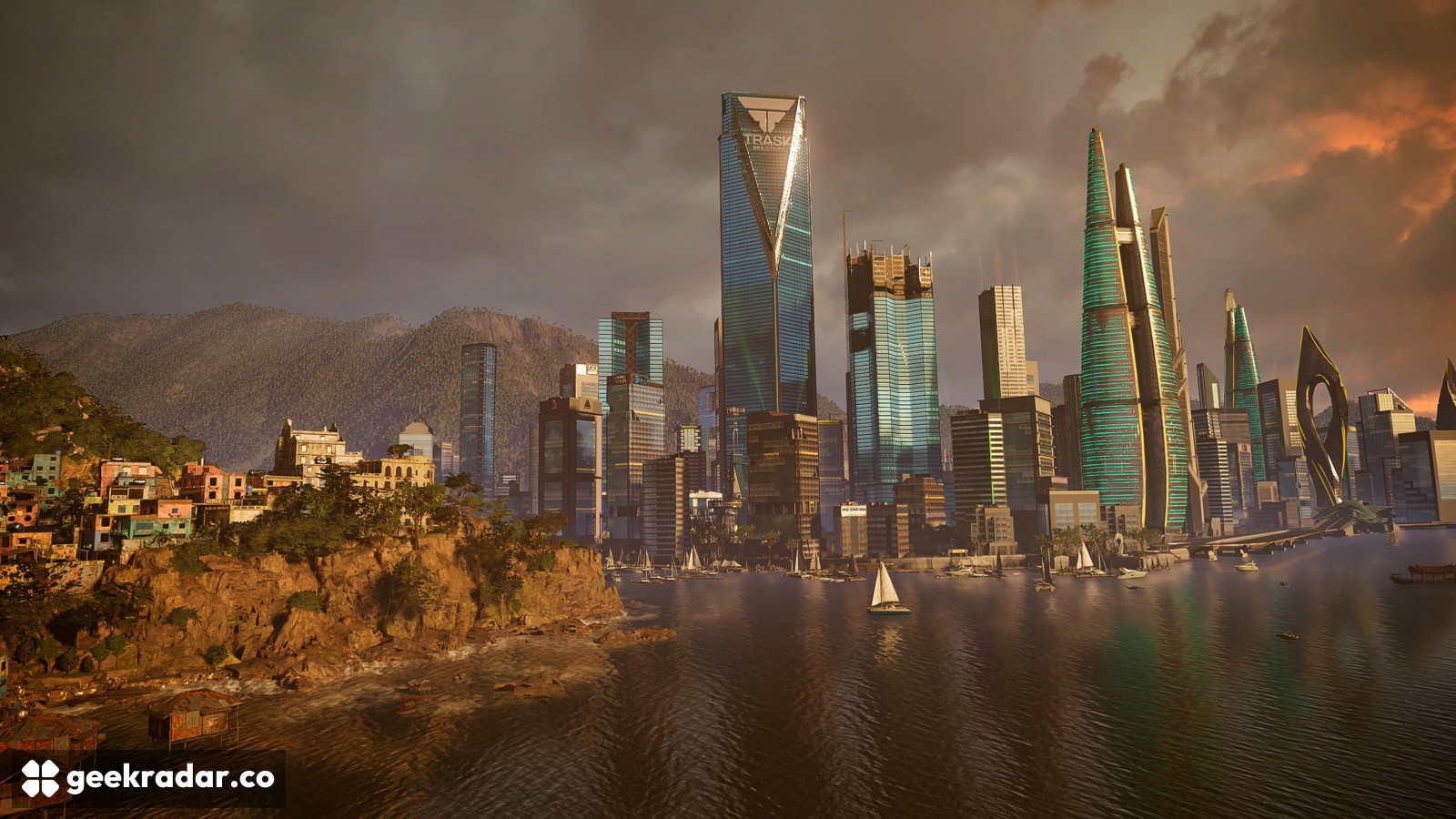
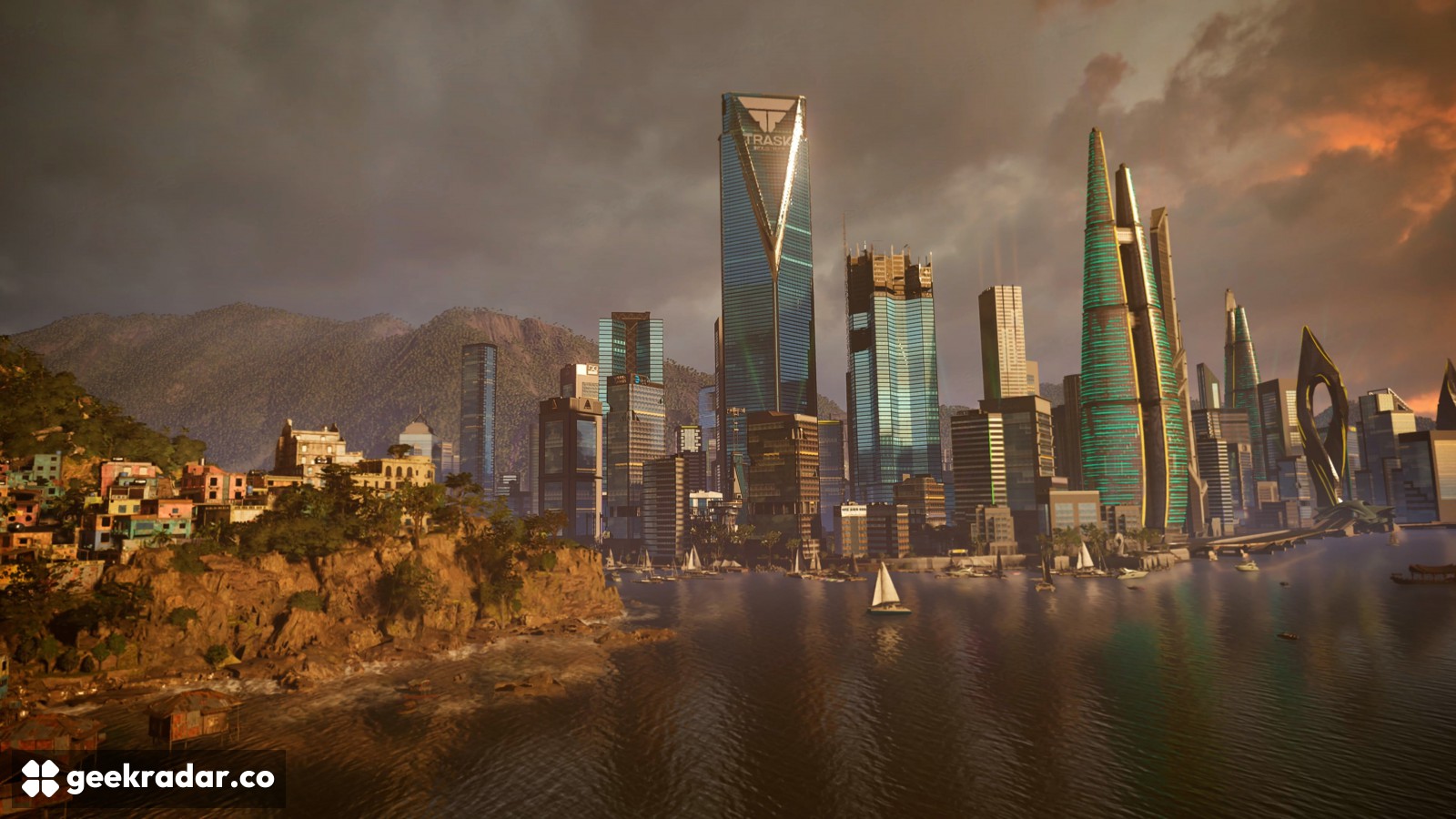
The two images accompanying this section are the same city view from Digital Foundry’s published QSSR comparison, with reconstruction enabled and disabled. Open each at full size and examine the repeated horizontal lines on the central tower and the narrow structures along the skyline. These are useful reference points because their shapes should remain continuous.
The frames establish a visual comparison in that captured scene. They cannot, by themselves, demonstrate how consistently an edge behaves across time. For that, use the original analysis and comparison viewer, which supplies the broader testing context. A compressed article image should not become evidence for a universal percentage improvement in sharpness.
Read the “off” frame as a baseline, not a broken game
Disabling QSSR does not mean disabling all reconstruction or antialiasing. The comparison is against the game’s existing solution. That matters: the benefit of replacing a weak baseline may be much larger than the benefit of replacing an already effective one.
In its hands-on report, Digital Foundry found a larger visual gain in Wolverine than in Ghost of Yōtei. Its Sony interview also identifies predominantly FP16 computation and extensive packed-math use for QSSR, rather than the Pro’s dedicated ML hardware path. These are implementation details, not a promise that every supported game will look identical.
FP16 describes a 16-bit floating-point number format used in calculations. It is not a resolution setting or a count of colors in the finished image.
The useful conclusion is to judge the complete game mode. A reconstruction upgrade can coexist with different shadows, reflections, resolution limits or frame-rate targets. Comparing two pictures without checking those conditions risks attributing every difference to the upscaler.
The performance cost is measured in milliseconds
Digital Foundry’s Wolverine test estimated an extra 1.5–1.8 ms over Insomniac’s existing reconstruction when going from 864p to 1440p in an uncapped scene. Its 2160p-output test estimated roughly 4.4 ms extra. At a 60 Hz target, dynamic resolution reduced the performance gap. In Yōtei, the unlocked comparison against FSR3 showed similar frame rates, with resolution equivalence still requiring confirmation. These are specific test conditions, not fixed costs for all PS5 games.
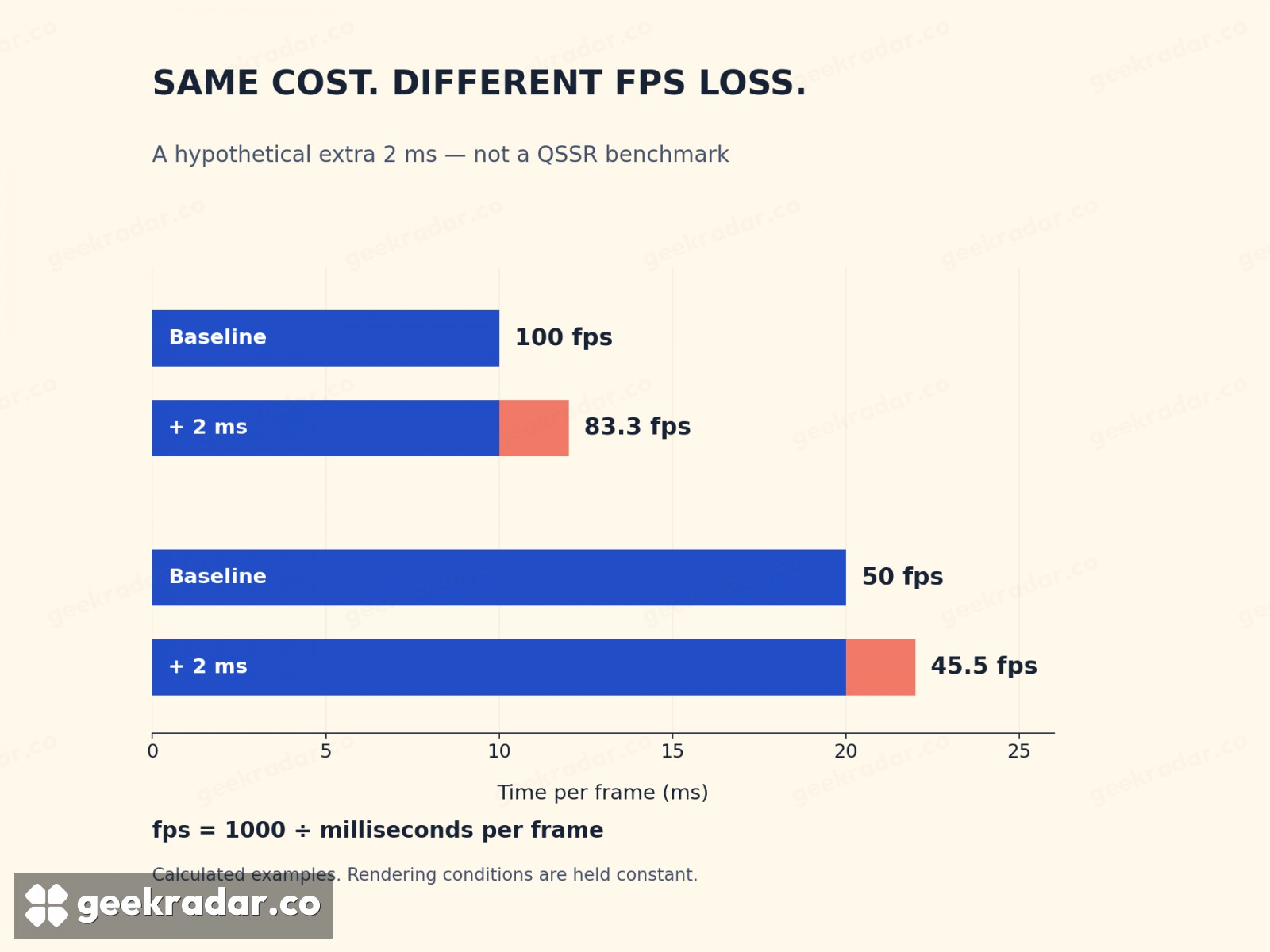
Frame time makes these results easier to interpret. A 60 fps target allows roughly 16.67 milliseconds for each frame; 30 fps allows 33.33 ms. An additional task has to fit somewhere within that budget or be offset by reducing work elsewhere. A fixed frame-rate cap can conceal spare capacity until a more demanding scene uses it.
The chart below illustrates the arithmetic with a hypothetical extra 2 ms. It is not a QSSR measurement. Starting at 10 ms per frame, adding 2 ms changes the rate from 100 to about 83.3 fps. Starting at 20 ms, the same addition changes 50 fps to about 45.5 fps. The time cost is identical; the apparent fps penalty is very different.
Why fewer source pixels can still produce a better picture
Dynamic resolution lets a game adjust its internal pixel count as workload changes. Suppose a developer wants to keep a 60 fps mode but introduces a more expensive reconstruction stage. One possible trade is to render fewer source pixels, spend the saved time on reconstruction and keep the output steadier.
This creates an initially counterintuitive result: the lower-resolution input can lead to the more convincing final picture. Input resolution still matters, because reconstruction needs useful evidence. It simply is not the only variable. Counting the starting pixels while ignoring the reconstruction stage is like judging a photograph only by its file dimensions.
There is a limit to this bargain. Lower the input too far and small features may have too little reliable information for reconstruction. A busy scene can also stress several systems at once. The right balance is a developer decision per game and mode, rather than a universal “QSSR quality” value that players can transfer between titles.
QSSR, PSSR and frame generation solve different problems
Sony positions PSSR as the higher-end reconstruction option on PS5 Pro. The hardware difference extends beyond the upscaler: the Pro’s original technical announcement describes a larger GPU, faster memory and improved ray-tracing capabilities. Installing a game patch cannot add those physical resources to a standard console.
That distinction also applies to the smaller PS5 models. Sony described the 2023 redesign as the same technology in a smaller form factor. “Slim” identifies that redesign; it does not make the machine a Pro. Disc versus digital distribution is likewise a different question from reconstruction capability.
| Term | Main job | What it does not establish |
|---|---|---|
| QSSR | AI image reconstruction for supported standard PS5 games | Universal support or a guaranteed fps increase |
| PSSR | AI image reconstruction on PS5 Pro | Identical quality in every game and graphics mode |
| Frame generation | Produce intermediate images between rendered frames | An equivalent increase in game simulation or input sampling |
| VRR | Let a compatible display vary its refresh timing | Additional rendering power |
Upscaling increases the spatial resolution of an image. Frame generation deals with additional images in time. AMD’s FSR3 documentation treats upscaling and frame generation as separate components; the shared word “AI” in graphics coverage does not erase that distinction. QSSR’s announcement is an upscaling announcement. It is not evidence of a new frame-generation mode in either launch game.
How to check it on your PS5
Start with the game update. In PlayStation Support’s procedure, highlight the game on the home screen, press Options and select Check for Update. Complete the installation before comparing graphics settings.
For Wolverine, Insomniac’s version 1.002.000 notes explicitly say QSSR is enabled by default on PS5. You therefore should not assume an additional manual activation is always necessary. Those notes carry an October 6 timestamp, while Sony’s October 1 announcement describes that day’s rollout; the support-page timestamp should not be mistaken for a different QSSR launch.
Ghost of Yōtei is the other title named in Sony’s initial rollout. Check the patched game’s graphics options rather than searching for a console-wide QSSR switch. Sony’s plan to offer the library broadly to developers is not a compatibility list for the rest of your library. A Pro enhancement badge also does not, on its own, confirm QSSR support on the standard machine.
Make a comparison that reflects how you play
Choose a safe, repeatable location with fine geometry and some movement. Keep the graphics mode, display configuration and camera position consistent. If the game exposes a reconstruction toggle, change that setting alone first; otherwise, do not describe a comparison between different modes as an isolated QSSR test.
Look at the picture while moving, then stop. A wire that flickers during a pan, foliage that leaves a trail and a distant sign that slowly resolves are different behaviors. A paused image can help locate the detail, but the transition tells you whether it remains useful during play.
Check responsiveness as well as appearance. If the sharper option compromises a mode you value for fluid movement, that is a real tradeoff. If both maintain the target comfortably, cleaner reconstruction may be a straightforward improvement. There is no need to prefer a technically impressive still over the setting that feels better during the game itself.
The useful upgrade is the one you can keep playing with
QSSR makes the existing PS5 more interesting because image quality is partly a software problem, even when the hardware budget is fixed. Its arrival gives developers another option between rendering more pixels and accepting a less stable picture. It does not retire either of those constraints.
For owners, the strongest case is refreshingly practical: install a supported update, keep the mode whose responsiveness you enjoy, and see whether the world holds together more convincingly while you move through it. The best result is a railing you can follow with your eyes without thinking about how it was reconstructed. That is a more meaningful improvement than another impressive resolution label on the box.