Windows 11 26H2 can now arrive without a click. Here’s which PCs go first
Microsoft is expanding automatic delivery to eligible 24H2 and 25H2 machines. The small download activates code that recent monthly updates have already put on the PC.
A Windows 11 PC that waited for its owner to click “Download & install” last month can now pick up version 26H2 on its own. Microsoft began expanding automatic delivery on November 18, starting with eligible machines running 24H2 or 25H2 whose updates are not managed by an IT department. The change reaches personal computers and can also reach a laptop someone uses to run a business. What matters is who controls updates on that machine.
The date marks a change in delivery. Microsoft released the 2026 Update in September. By late October, eligible users could request it manually. In the November rollout notice, Microsoft says more PCs will now receive it without their owners initiating the download. The rollout is gradual and depends on Windows Update settings. Two eligible PCs on the same desk can therefore show different things when you open Settings.
Why a year's update can fit into one restart
On these systems, much of the work has already happened. Versions 24H2, 25H2 and 26H2 share an operating-system core. Recent monthly updates for the first two versions include code for 26H2 features that remains dormant until a small download, called an enablement package, switches it on. Microsoft documents the shared files and the required prior updates in KB5121794.
That explains how a machine already current on its monthly updates can change its annual version with one restart. A PC that is behind may still need to download the prerequisite updates first. And the new version number tells you which release the machine is running. It says little about any particular feature you saw demonstrated in an Insider preview such as Narrator’s math navigation.
What the update switch actually changes
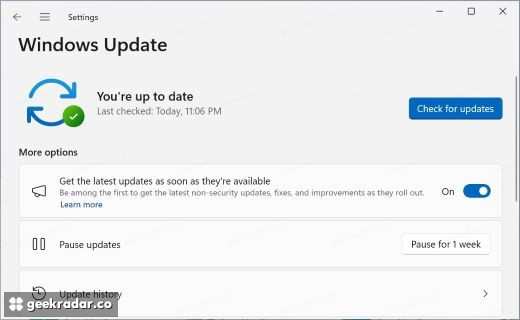
To see whether the release is available, open Settings → Windows Update and choose Check for updates. There is a second, separate control lower on the page for getting new updates as soon as they are available. Turning that on gives the device priority for eligible feature and other non-security updates. Leaving it off still allows the usual security updates, as Microsoft’s guide to the switch explains.
For a work laptop, the first question is whether the organization manages its updates. For a personal laptop, it is whether Windows Update is offering the release yet. Microsoft can hold delivery where it identifies a compatibility problem. An empty update screen on a particular morning is a poor diagnostic on its own. The more useful decision is whether you want priority for future changes as well as this one, because that switch stays on after 26H2 arrives.