Proton Drive can copy your Google files. Who gets to open them afterward?
Easy Switch preserves folders in a personal Google Drive. Ownership, export limits and a fresh set of sharing permissions decide what actually makes it across.
Two people keep a holiday budget in Google Drive. You own the folder and the itinerary. A friend made the spreadsheet and shared it with you. Import that project into Proton Drive with Easy Switch and the itinerary can make the trip while the spreadsheet stays behind. Even the documents that arrive need fresh invitations before you can carry on working together.
Proton began rolling out Easy Switch for Drive on November 19. It copies files from a personal Google Drive directly to Proton’s servers. That solves a practical problem for anyone whose cloud archive has outgrown their laptop: you can start the import in a browser without downloading the archive first. Your choice of files is much less flexible. The importer takes all the supported items you own, with no folder picker. Google Workspace accounts, Google Photos, shortcuts and items shared with you fall outside its scope. Proton’s import limits
The folder survives. Its guest list needs rebuilding
A Google Drive folder serves two purposes. It organises material, and it gives people a place to collaborate. Easy Switch preserves the folder hierarchy for the material it imports. It leaves the sharing settings behind. If you own the budget spreadsheet, for instance, a copy can arrive as an Excel workbook. Your friend’s old Google link still points to the Google version. Before the next person enters an expense, decide which copy the group will use and share that one.
The conversion also changes what you can expect to see on arrival. Google Docs, Sheets and Slides export as Word, Excel and PowerPoint files. A familiar filename inside the right folder can therefore open a different kind of document. For work passed between several people, it pays to open the converted file and check the parts everyone actually uses, such as the formulas on the totals sheet. Our comparison of Google Drive and OneDrive looks at how ownership affects that handover.
What a successful import tells you
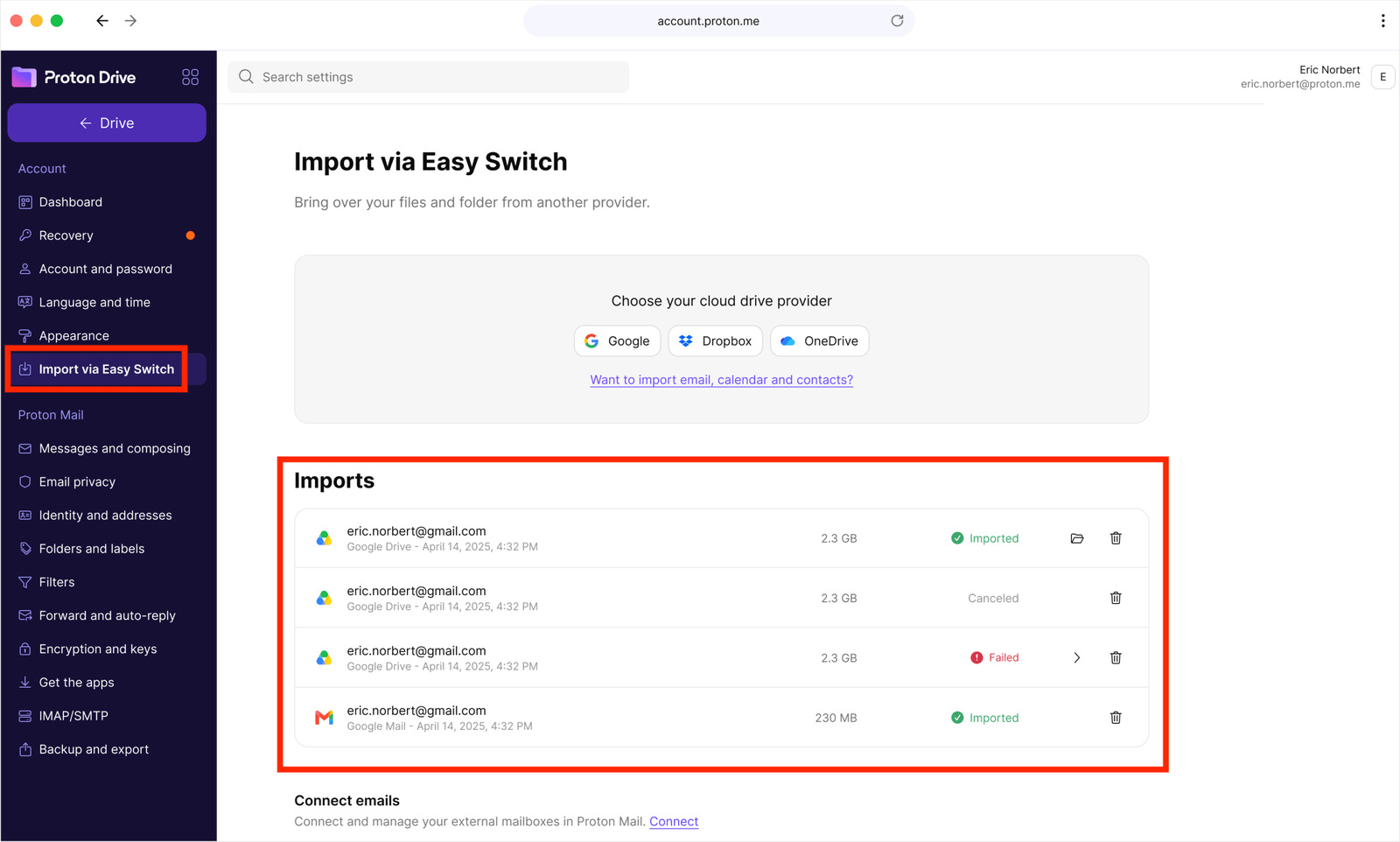
Start from the web version of Proton Drive, choose Import via Easy Switch in settings, then grant access to your personal Google account. The transfer runs in the background. Proton says it gives up that access when the operation ends. Its illustrated import instructions show where to check progress.
There are two different size checks worth making before you start. Each import can contain up to 100 GB and 100,000 files, and you need enough free space in the destination account. Individual files have their own limits. An uploaded PDF can be as large as 50 GB, but Google’s export limit for a native document is 10 MB. A large Slides presentation can therefore be skipped while a much larger PDF makes it across. Proton continues with the rest and emails a CSV listing what it skipped and why.
Leave a busy shared project alone during the transfer if you can. Edits made on Google’s side while it runs may miss the copy. Running the import again creates another folder and copies the eligible files again. The best time to send out a new link is after opening the spreadsheet, reading the exception report if there is one, and agreeing where the next expense should go.