GTA VI crashed on PS5 with CE-108255-1. Here’s what to check before reinstalling
Some players report repeat crashes near the start of GTA VI. The PS5 error history and a separate check on the game download can narrow down what to report to support.
If Grand Theft Auto VI closes on PS5 with CE-108255-1, the most useful thing to do before launching it again is to open the console’s error history. The entry keeps the error details available after the crash screen disappears. The code alone says little about the cause: Sony defines it as an error in a game or application. It gives you no reason on its own to erase your save or send the console away.
GamesRadar+ found more than a dozen player reports describing similar crashes, including people unable to get through an opening scene. Those accounts establish a problem worth investigating. They don’t supply a failure rate, identify a particular model of PS5 as faulty or demonstrate that everyone is hitting the same bug.
Check what the console recorded
Open Settings → System → System Software → Error History and select the entry for the crash. Sony says individual entries can contain further details. Keep the exact code and note what you were doing, whether you loaded an existing save, and whether the crash returns at the same point. If a friend sees a different code, the fact that both games closed is a poor reason to follow the same fix. PlayStation’s error-history guide.
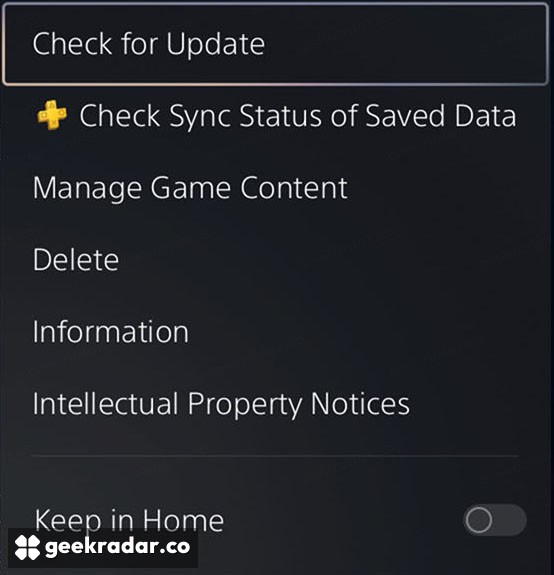
Now highlight GTA VI on the home screen and press the controller’s options button. Select Information and check the download status. Then return to the options menu and select Check for Update. This checks the installed game. The PS5 system update required at GTA VI’s launch is a separate check. If the console says the game is current, that tells you what is available to install today. It doesn’t promise that a fix exists for your crash.
The detail that changes a support report
Before spending an evening downloading the game again, try another installed game. If only GTA VI closes, the useful detail for Rockstar Support is how narrowly you can describe the failure. A crash that always follows a particular load is a different lead from one that appears at unrelated times in several games.
Sony’s troubleshooting guide for digital games also suggests checking whether the problem occurs when starting without an existing save. Preserve your current progress before trying that comparison. A different outcome gives support a clue about the conditions of the crash. It still does not establish that the original save is corrupt.
If other games repeatedly close as well, include their names and error codes when contacting PlayStation. For a technician, the difference between “GTA VI quit twice while loading the same save” and “three games quit at different points” can be more informative than an error code shared by both reports.