GTA VI audio out of sync? Try wired headphones before changing the TV settings
A pair of wired headphones and a short capture can narrow down a delay. Rockstar recommends different low-latency settings on PS5 and Xbox once the TV setup is implicated.
If a car door closes in Grand Theft Auto VI and the thud arrives a beat later, leave the audio sliders alone for a moment. Plug wired headphones directly into the controller and listen to the same action again. If the door and the sound now match, you’ve learned something more useful than a new volume setting: the delay changes when the sound takes a different route.
That’s the first check in Rockstar’s support notes for PlayStation 5 and Xbox Series X and S, both updated on November 19. The advice applies to Rockstar games on those consoles. It gives GTA VI players a way to narrow down a problem at home without assuming everyone playing the game is hearing it.
Take the television out of the replay
Pick a short, repeatable sound with a visible beginning. A closing door makes a better reference than music drifting out of a car window. With wired headphones in the controller, you’re still looking at the same television, but the sound no longer travels through its speakers, soundbar or receiver. If the timing lines up, Rockstar points to the external audio or television setup.
A second test changes the picture path as well. Record a few seconds with the console and play the clip on a different device. On PS5, Sony’s capture guide explains how to open the Create menu and save recent gameplay. Xbox has its own capture function. Watching a clean clip through the same TV and speakers could introduce the same delay all over again. A clip that looks and sounds right elsewhere gives you a reason to investigate the living-room setup. If both tests still sound late, the result alone can’t tell you which component is responsible.
One TV setting, two different console settings
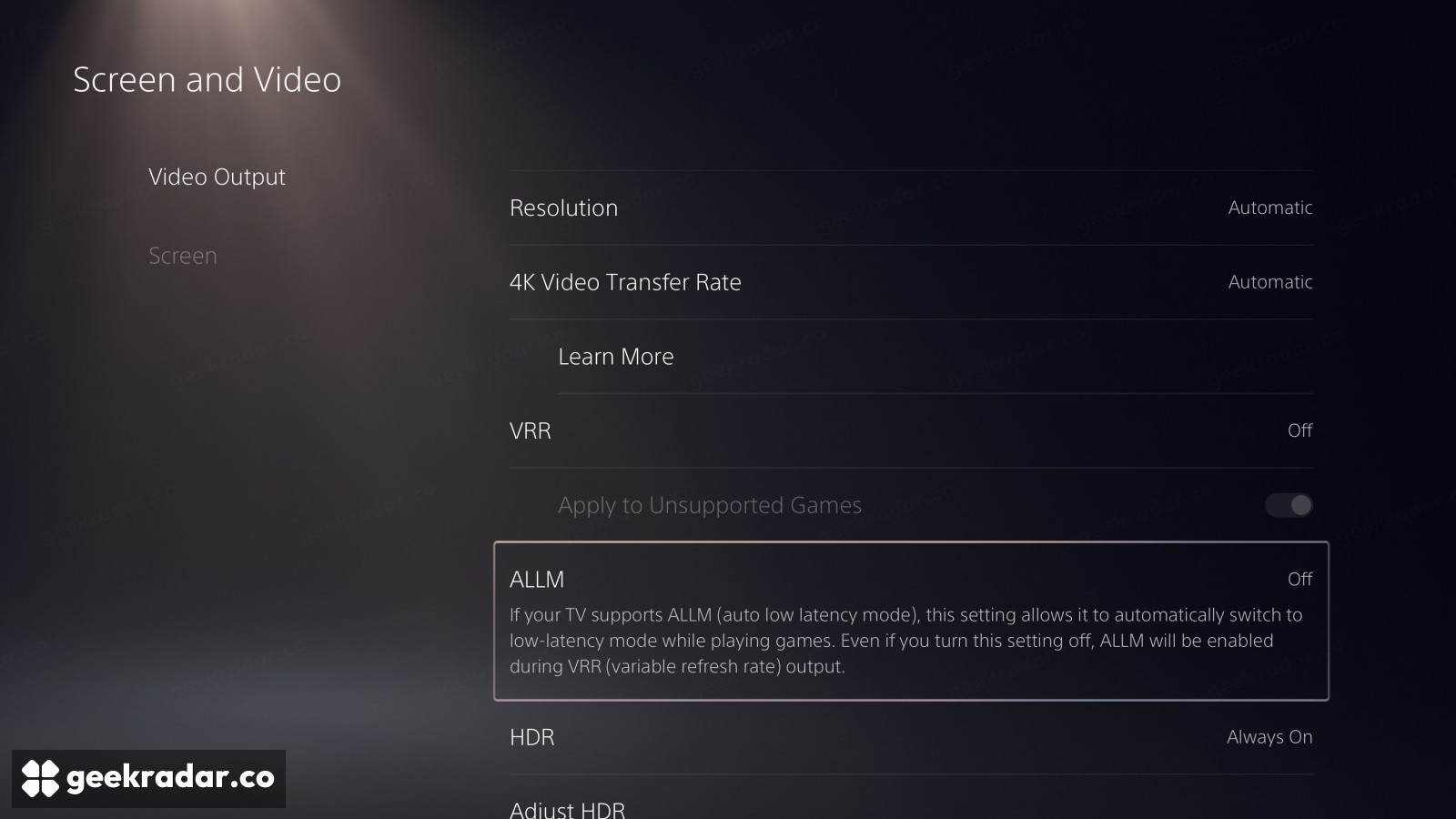
For a delay traced to the external setup, Rockstar suggests trying the TV’s Game Mode. Its instructions then diverge. On PS5, open Settings → Screen and Video → Video Output → ALLM and select Off. On Xbox Series X or S, go to Settings → General → TV & display options → Video modes and enable Allow auto low-latency mode. Note your original settings so you can compare the same door sound before and after each change.
Why can Game Mode on the TV stay on when ALLM on the PS5 is off? One is a picture mode you can select on the display. The other lets the console ask a compatible display to enter its low-latency mode automatically. There’s one wrinkle on PS5: Sony says variable refresh rate output can still trigger low-latency mode even with ALLM set to Off. To isolate that behavior during a test, VRR must also be off. You can restore it afterward and compare.
That’s a different problem from making dialogue easier to hear in GTA VI. Louder dialogue might help you catch a word. It won’t tell you why the word arrived after the character’s mouth closed. If the word lands on time through the controller, you know where to listen next.