iOS 27’s scam protection sends a risk signal. Your app decides what happens next
Apple’s anti-scam setting targets pressured actions by legitimate users. Its privacy notice also explains why the process is not entirely on-device.
An iPhone can recognize the right account holder and still be helping that person make the wrong payment. That is the gap Apple's Impersonation Risk Detection tries to address: a scammer persuades the legitimate user to act, so a successful identity check does not resolve the danger.
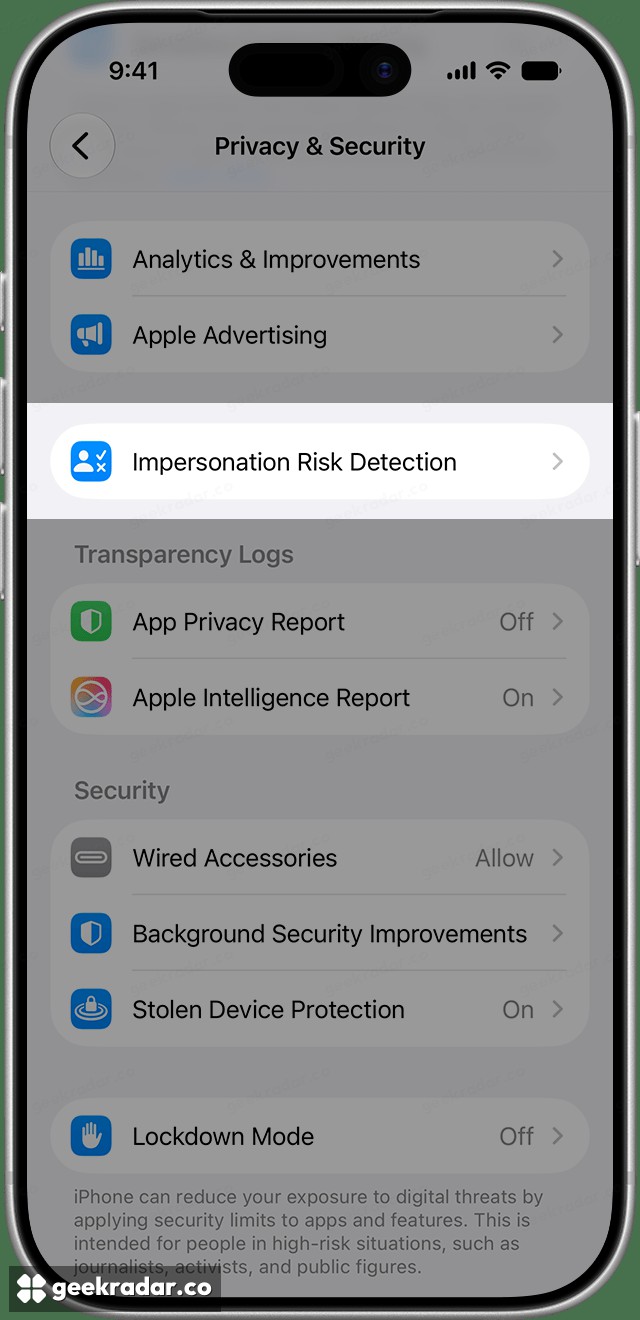
Settings image: Apple.
The feature is drawing renewed attention in US searches, but it is not an October 21 launch. Apple's support explanation, dated September 14, describes it as available from iOS 27 and iPadOS 27 in apps that support it. Updating the operating system alone does not turn every banking or payment app into a participant.
Its central idea is straightforward. At a sensitive moment, a participating app can ask for a risk assessment and use the result to decide whether to intervene. Apple supplies a signal; the app chooses the response. That could mean a warning, another check or a delay. It is not an Apple-operated switch that automatically refuses suspicious payments everywhere.
Why proving identity does not prove intent
Consider someone following instructions from a caller pretending to be their bank. They may unlock their own phone, open the real banking app and approve an action themselves. Nothing in that example requires a stolen password. The account holder's participation is exactly what makes the attack difficult to distinguish from ordinary use.
This is a different problem from the password-replacement work described in our look at Google's move toward passkeys. Stronger sign-in helps establish access to an account. It cannot, by itself, establish whether the person using that access understands the transaction or is being pressured.
That last distinction is important for interface design. A missing warning should not become a reassuring green light. The system can introduce a useful pause, but it cannot establish that the person on the other end of a conversation is who they claim to be.
The privacy boundary is more specific than “on-device”
Apple's privacy notice describes a two-stage process. The device assesses usage patterns, including whether screen sharing is active and approximate recent call or email counts. The assessment travels to Apple, while the underlying device data does not. Apple combines it with account activity, such as recent App Store downloads and purchases, to produce the signal sent to the app.
Apple also receives the category of attempted activity, such as signing in or making a payment, and feedback about how the app used the signal. Its notice says it does not learn which app requested the assessment or the content of that in-app activity.
Those details rule out two tempting shortcuts. This is not permission for a participating app to inspect the raw device information. Equally, describing the entire process as happening only on the phone would omit Apple's server-side role. The distinction is between sharing an assessment and sharing the underlying observations, rather than between sharing everything and sharing nothing.
Where to enable it and inspect access
Apple's iPhone user guide places the control in Settings → Privacy & Security → Impersonation Risk Detection. Enable “Share with App Developers”; signing in to the App Store may be required. The same area shows recent requests and their reasons, and lets you manage individual apps.
Apple warns that changes can take up to 24 hours to take effect. A caller telling someone to disable this protection is itself a reason to question the conversation, not a routine troubleshooting instruction to follow blindly.
The feature's practical value will depend on the apps that adopt it and the responses they attach to its signals. A warning that gives someone time to reconsider an urgent demand can matter. A setting that readers assume protects every transaction can create a confidence the implementation does not support.