GTA VI can count one button press as four. Here’s where to change it
Tap Assist changes repeated presses. Other settings shorten holds, switch individual actions to a press or simplify a minigame that asks for several inputs together.
In this guide
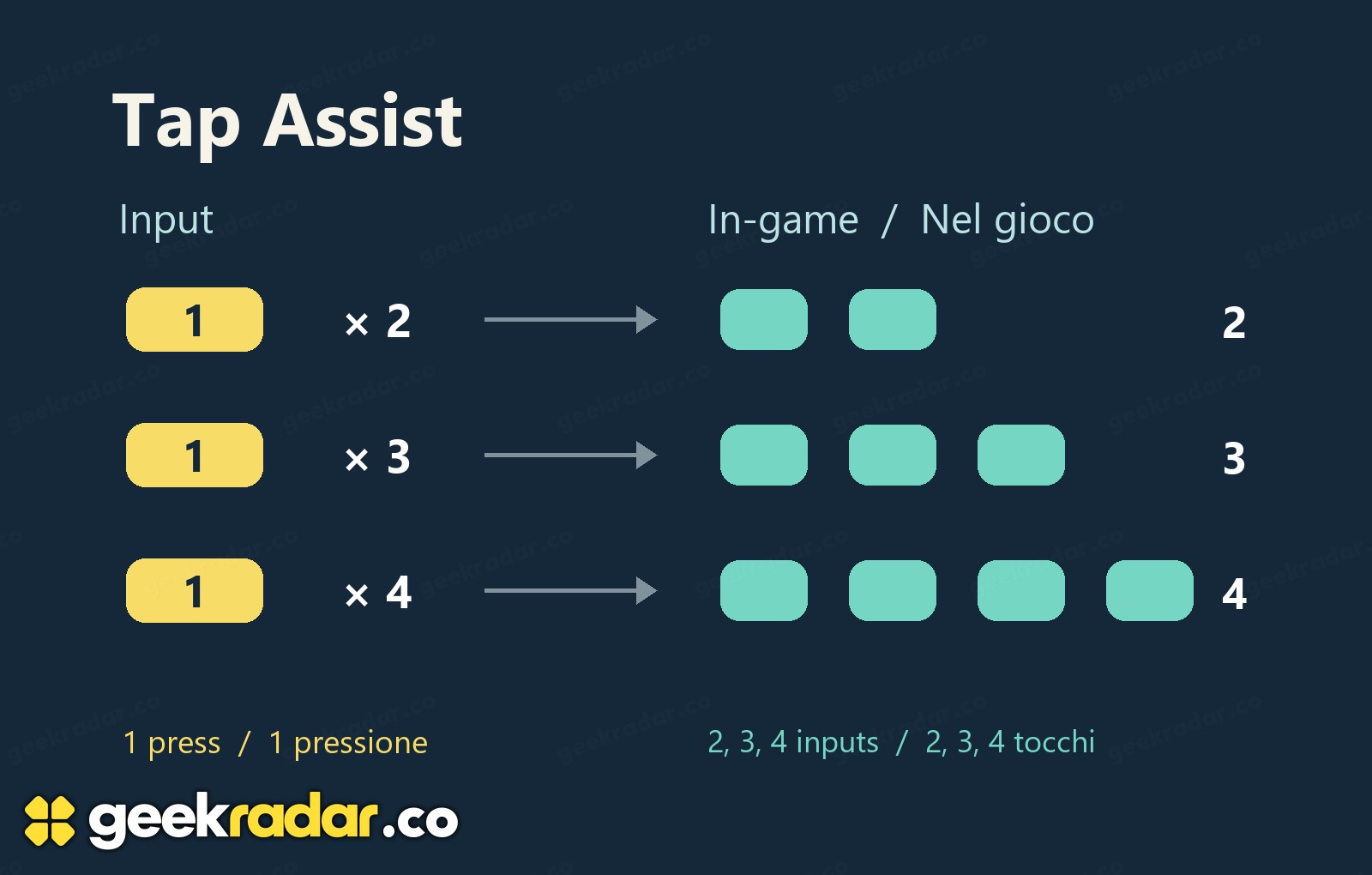
If a prompt in Grand Theft Auto VI asks you to hammer a button, one physical press can count as two, three or four. Open the pause menu, choose Settings, then look under Gameplay → Accessibility → Tap Assist. The English-language PS5 menu also offers a hold in place of repeated presses. That gives you two ways to ease the same action, depending on whether repetition or sustained pressure feels more comfortable. See the PS5 settings screen.
What the multiplier actually changes
Imagine a sequence that calls for eight taps and accepts Tap Assist. At the two-times setting, four presses supply those eight inputs. At four-times, two presses do it. Eight is just an example, so there’s no need to know the target count before choosing a setting. The useful distinction is whether you still want to tap in rhythm or would prefer to keep the button down until the prompt finishes.
This is easy to miss if you start in the Controller tab. Rockstar’s guide to the settings menu puts stick sensitivity, inversion and DualSense features there. Control Scheme, in turn, shows the layout for a particular activity. Moving an action to a more convenient finger may be exactly what you need. It can still leave that finger doing the same number of presses. Tap Assist changes how the game counts the movement itself.
When holding is the hard part
The hold option in Tap Assist solves one problem by asking your hand to do something else. If keeping a trigger depressed is the tiring part, look at the action you want to change. The English PS5 menu has a separate Aiming setting that lets you choose whether to hold or press L2 to aim. This changes the gesture in the game. Adjusting a DualSense trigger’s resistance instead changes how the trigger feels under your finger. A lighter trigger can still ask you to hold it throughout a sequence.
There’s a middle ground if you like the deliberate feel of holding to confirm something but find the wait too long. Rockstar’s accessibility reference describes a multiplier that shortens supported hold inputs. Try it on a familiar prompt and release the button as soon as the action registers. Then try an ordinary short press. That gives you a practical way to judge whether you can still distinguish the two gestures at your preferred setting.
Match the assist to the activity
Some awkward moments have little to do with repetition. A gym interaction can demand several inputs together. Rockstar lists a separate option to simplify minigames, including exercise. If you can comfortably press each button on its own but lose the sequence when the prompts overlap, that’s the setting to try during a workout at the bench. If you take Jason fishing, reeling has its own input option. Check that before changing how the controls behave for the rest of your time in Leonida.
Pick one action you already know and change one setting before trying it again. If a short press now does the job that made you put the controller down, you can leave the rest of the game playing exactly the way you like.